Karl_Williams
Posts: 61
Joined: Wed Mar 13, 2013 1:26 pm
Contact: Website

Slicer filling in holes on a few layers

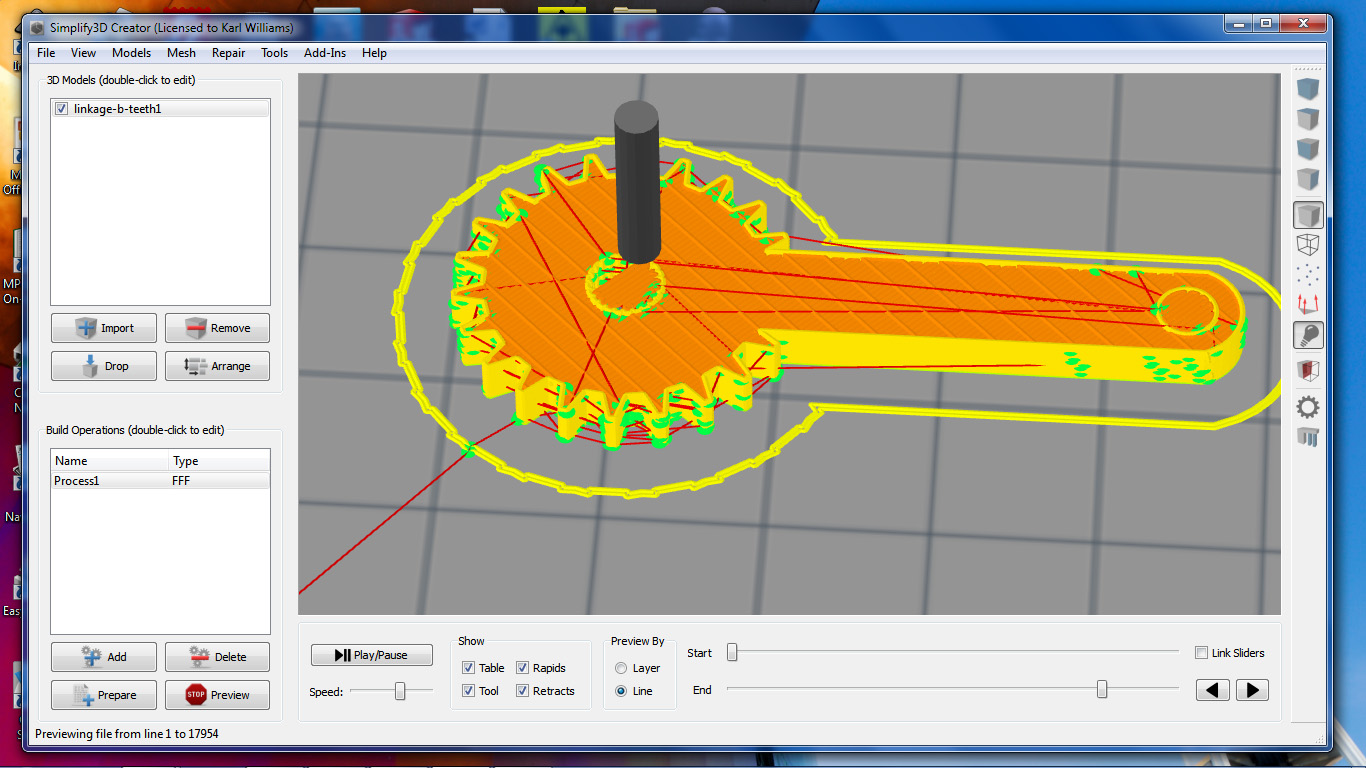
I've noticed that on parts with holes, the slicer will fill them in on a few layers.

The original STL part:
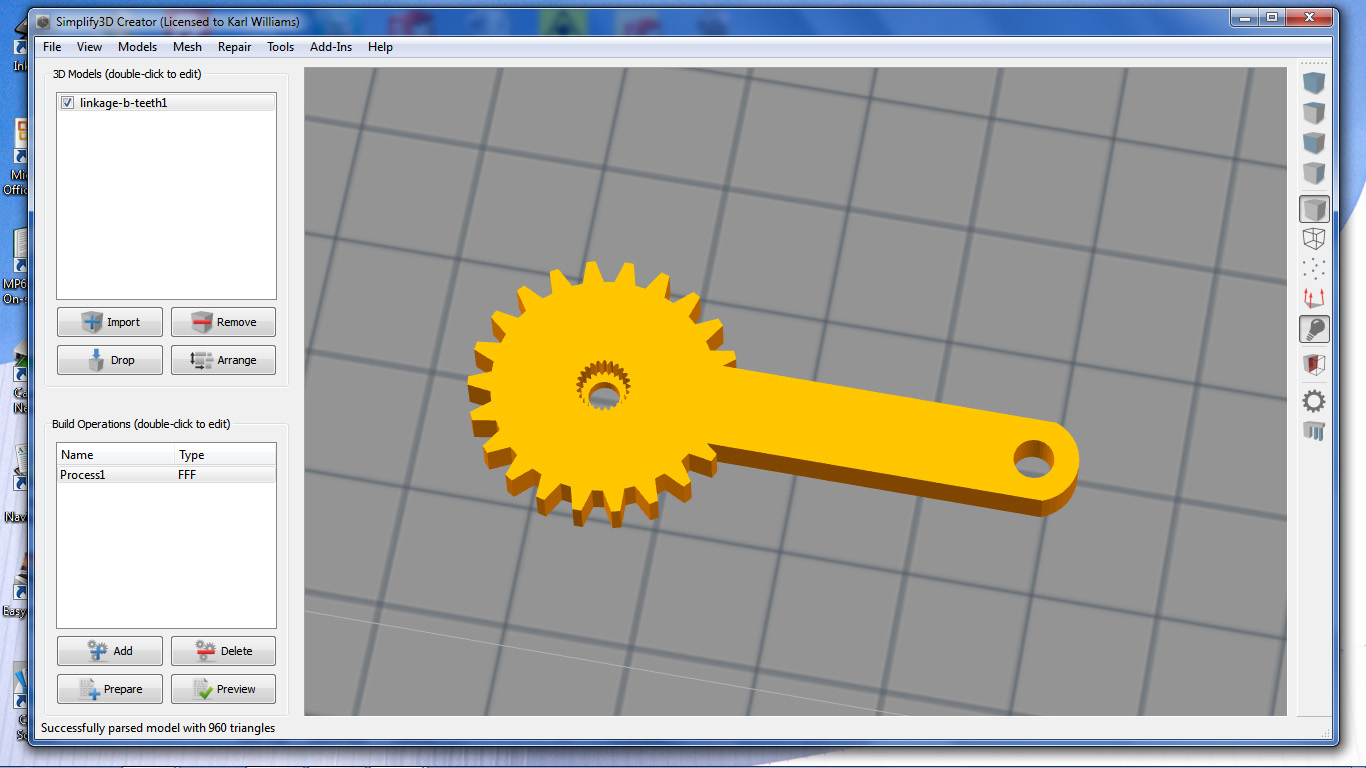
Image

Simulation going okay at this point:

Image

Then it fills in the holes:

Image

I've reproduced this with other parts where it fills in the holes on random layers.

With a different part, on the last top layer it extrudes into air over the hole:

Image

Karl
Simplify3D
Site Admin
Posts: 310
Joined: Sun Feb 10, 2013 8:28 pm

Re: Slicer filling in holes on a few layers

Hey Karl, a couple questions for you. What version of Creator were you seeing this issue with? We had one problem in 1.0.5 that we fixed in 1.0.6 that might help. What you're seeing definitely isn't correct, so we will try to dig into it and figure out what's going on. Can you post the original STL file along with your FFF settings? Or if you want you could just do File > Save Factor File and attach that (since it includes all imported models and FFF settings).

Thanks
Karl_Williams
Posts: 61
Joined: Wed Mar 13, 2013 1:26 pm
Contact: Website

Re: Slicer filling in holes on a few layers

This is with release 1.0.6. I have 1.0.3 installed on a different computer and it doesn't seem to be a problem in 1.0.3.
Something I just noticed is that if I import the stl file, add the build operation process, save it as a factory file, open the factory file and then prepare the g-code, it slices properly.
If the stl is imported and prepared directly then the problem shows up. I'll email you the files directly so you can take a look.
Simplify3D
Site Admin
Posts: 310
Joined: Sun Feb 10, 2013 8:28 pm

Re: Slicer filling in holes on a few layers

Karl,

Check your email.
User avatar
jdurand
Posts: 17
Joined: Thu Jan 29, 2015 6:13 pm
Location: Silicon Valley, California
Contact: Website

Re: Slicer filling in holes on a few layers

I'm still getting this with version 3.1.1, I can often work around by making a slice in the part (essentially making a C with a very small opening) and letting the slicer heal it back. This doesn't always work and I have a couple of products for my company hung up while I try to hammer S3D into not filling in the holes.
User avatar
dkightley
Posts: 2405
Joined: Tue Mar 10, 2015 4:09 pm

Re: Slicer filling in holes on a few layers

At first glance, this looks like an issue that has been around for a while where S3D is having problems dealing with meshes that have minute imperfections in them. There were some changes in one of the v3 upgrades that reduced the likelihood of this issue happening....but there's been one reported instance recently of there still being an issue that rears its head...but less frequently nowadays.

One solution is to push the mesh through one of the online repair services.....however a quick fix that works more times than it doesn't is to change the layer thickness very slightly....in 0.001mm steps....to see if you can get the slicer to "miss" the point that is causing the problem.

I'm also wondering how that complex toothed shape has been created. If you've used multiple overlapping shapes then there may be a separate issue getting in the way. This one has a very simple solution.... use the Separate Connected Surfaces option on the Mesh menu. Try it....and if the list of models increases, then you'll have got rid of interleaving meshes causing included voids in the sliced model.
Doug Kightley
Volunteer at the National Tramway Museum http://www.tramway.co.uk
Railway modeller and webmaster at http://www.talkingtgauge.net
User avatar
jdurand
Posts: 17
Joined: Thu Jan 29, 2015 6:13 pm
Location: Silicon Valley, California
Contact: Website

Re: Slicer filling in holes on a few layers

In my case I can make a simple cylinder and S3D will fill it in.

I'm generating the models from TurboCAD Pro 2015, I draw as solids and save as STL.

Afinia/UP slicer has no problems with these models at all but I need to print things on my larger delta printer.

Mattercontrol says "too many polygons" for even a couple of cm piece of one of my models, doesn't help as the whole thing is 25cm tall.
User avatar
jdurand
Posts: 17
Joined: Thu Jan 29, 2015 6:13 pm
Location: Silicon Valley, California
Contact: Website

Re: Slicer filling in holes on a few layers

I just tried changing the layer thickness and the separate command. Testing on a simple item, just a spiral tube on a disc. Still fills in the tube.
S3D-Jason
Posts: 1608
Joined: Sun May 31, 2015 6:01 am

Re: Slicer filling in holes on a few layers

Please create a separate topic for your issue and attach your STL file to that thread

Return to “Troubleshooting and Bug Reports”