Autodesk Fusion 360.
http://www.autodesk.com/products/fusion-360/overview
If you are a hobbest or a start up company you can register and use it free. Easy to learn.
Search found 16 matches
- Sun Oct 11, 2015 6:24 pm
- Forum: General Discussion and Tips
- Topic: Modelling program.
- Replies: 15
- Views: 13504
- Jump to post
- Wed Aug 05, 2015 12:34 am
- Forum: General Discussion and Tips
- Topic: Simplfy3D,Windows 10 and the DaVici 1.0?
- Replies: 3
- Views: 2726
- Jump to post
Simplfy3D,Windows 10 and the DaVici 1.0?
Has anybody upgrade their PC to Windows 10 and has a DaVici 1.0? From what I have seen posted in some other forums is Windows 10 now shows the DaVici as a printer and not as a com port. I have not upgraded the PC that my printer is on and was just wandering if any has and if Simplify3D is connecting...
- Tue Jun 23, 2015 5:37 pm
- Forum: General Discussion and Tips
- Topic: Wow to v3.0
- Replies: 8
- Views: 5649
- Jump to post
Re: Wow to v3.0
Love the new version.  GREAT WORK!!!!!
GREAT WORK!!!!! - Tue May 19, 2015 7:26 pm
- Forum: General Discussion and Tips
- Topic: S3D Doesn't know Table Size...
- Replies: 6
- Views: 4355
- Jump to post
Re: S3D Doesn't know Table Size...
I also have a Creator Pro and that is the way S3D does it.
- Mon Apr 20, 2015 7:59 am
- Forum: General Discussion and Tips
- Topic: Duel extruder print with an offset on FFCP
- Replies: 2
- Views: 1883
- Jump to post
Re: Duel extruder print with an offset on FFCP
Thats JoeJ. I finely got it fixed last night about 3am my time(USA East Coast).JoeJ wrote:Your toolhead offsets must be wrong in the firmware. The way that you adjust them varies depending on what firmware you have, but you will need to add 2.42mm to the X-axis offset
- Sun Apr 19, 2015 8:49 pm
- Forum: General Discussion and Tips
- Topic: Duel extruder print with an offset on FFCP
- Replies: 2
- Views: 1883
- Jump to post
Duel extruder print with an offset on FFCP
On my Flash Forge Creator Pro I was trying to print a sign with both extruders, but when it switches from the right to the left it shifts the print to the left by 2.42mm.
How can I fix this?
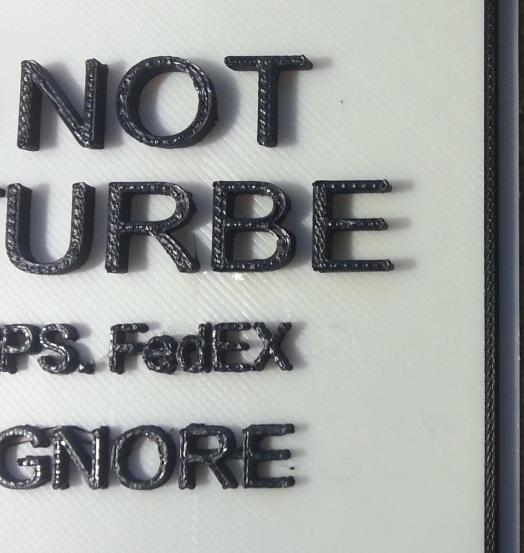
Thanks.
How can I fix this?
Thanks.
- Thu Feb 19, 2015 2:43 am
- Forum: General Discussion and Tips
- Topic: Filling in Holes that are not supposed to be filled.
- Replies: 8
- Views: 13430
- Jump to post
Re: Filling in Holes that are not supposed to be filled.
Thanks for the help guys. The suggestions didn't work out I'm afraid. Oh, rforemen -- thanks for the link. I posted the file, but soon realized it wasn't something instant. The progress bar remained at 5% for an hour, which is when I noticed in small print, my object was waiting in a queue, so I ju...
- Mon Feb 16, 2015 8:27 pm
- Forum: General Discussion and Tips
- Topic: Filling in Holes that are not supposed to be filled.
- Replies: 8
- Views: 13430
- Jump to post
Re: Filling in Holes that are not supposed to be filled.
Hey Jcat you need to run the .stl file through this site.
https://netfabb.azurewebsites.net/
It's a Micrsoft site.
You have to sign up or log in with a Microsoft account but it will fix the issue.
https://netfabb.azurewebsites.net/
It's a Micrsoft site.
You have to sign up or log in with a Microsoft account but it will fix the issue.
- Sat Feb 14, 2015 3:40 pm
- Forum: General Discussion and Tips
- Topic: Best Settings for Da Vinci 1.0
- Replies: 5
- Views: 10369
- Jump to post
Re: Best Settings for Da Vinci 1.0
Thanks for the profile post. I noticed its set for PLA. Will these settings work with ABS? I also noticed your bed temperature settings. Do you find you get curling with the 80 degree temp? When I started printing and kept the whole thing at 80, I was getting consistent curl on wide prints. When I ...
- Fri Feb 13, 2015 12:26 pm
- Forum: General Discussion and Tips
- Topic: Best Settings for Da Vinci 1.0
- Replies: 5
- Views: 10369
- Jump to post
Re: Best Settings for Da Vinci 1.0
I posted this in another thread but will also post it here. I get great prints with it. I am not sure it is the best but it works well for me.
