EricPeterson
Posts: 10
Joined: Wed Jun 17, 2015 10:46 am

Reliable S3D Crash Processing Array Part

I've noticed on occasion the slicer has problems with repetitive feature arrays. This one is repeatable and crashes S3D hard with some unusual system errors.

Files used are here. It's a big archive because it's a big part. STL and factory file included.

http://scifiwheels.com/images/M2Issues/Array.zip

The system is Win7 Pro 64, intel i7-3770, 64 gb RAM, terabyte RAID 1 array + SSD system volume, nvidia GTX 670 w/4 gb GDDR5.

S3D version installed is 3.0.1.

Start Simplify 3D. Import the STL model.

Allow S3D to automatically scale the part to millimeters.

Rotate about x, 90 degrees.

Center and Arrange.

Set up for PLA using the Makergear M2 latest single 24v hot end profile.

Change some settings -- what I did is in the factory file.

Save factory file.

Prepare to Print.

Results:

All system, CPU, and GPU fans immediately advance to 100% speed.
All eight CPU cores immediately peg to 100% utilization.
S3D displays message about parsing.
S3D says parsing is complete.
S3D says "Previewing file from line 1 to 8496244".
After a minute or so, S3D crashes hard with the attached system GPU memory error.
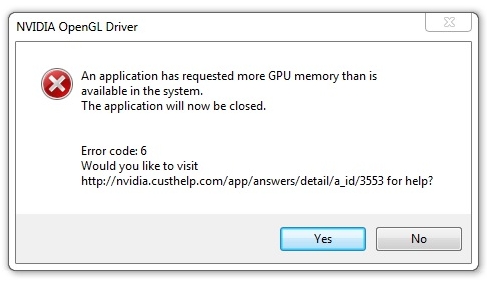
Image

There's an easy workaround -- I just cut the number of parts in the array down to 20. But I thought I'd upload this for reference.

- ep
User avatar
jimc
Posts: 1124
Joined: Wed Aug 28, 2013 11:02 pm
Location: mullica, nj
Contact: Website

Re: Reliable S3D Crash Processing Array Part

funny, I got that error once when I was running my little quadro 420k that only had 1gb. once I upgraded to a gtx960 4gb I have never gotten that error again. I have actually purposely tried. I loaded an item and duplicated it about 80 times until it loaded an area about 10 times the size of my build platform then sliced. no crash which is odd since I have 4gb now just like you. have you checked to see if your NVidia drivers are up to date? also looking at the amount of lines you have, that's a lot and really doesn't seem right. #1 check the model for errors. send it through the netfabb cloud svc.

https://modelrepair.azurewebsites.net/index.php

also check the complexity of the model. if the mesh is ultra dense then s3d will make thousands upon thousands of moves it does not need to. the movements will end up very jittery.
EricPeterson
Posts: 10
Joined: Wed Jun 17, 2015 10:46 am

Re: Reliable S3D Crash Processing Array Part

Yep, the nvidia drivers are up-to-date, and there are no errors. I ran it through every checker I could find as well as my own. I've never seen an error in a part coming out of Solidworks.

However, your comment about the mesh being "ultra dense" got me thinking. I've never seen this type of arrayed part failure on anything that comes out of MAX, where the topological resolution is relatively low, having been explicitly set by the modeler. Parts coming out of Solidworks -- for which there are pretty much no export configuration options -- are extremely dense. The number of effective circumferential divisions in a cylindrical part, for example, is high enough that all you see is edges in the wireframe in the instant before the export writes. This is of course to support NC machining, which is somewhat less forgiving than extrusion printing when it comes to geometric aliasing.

I'm sure there were just too many faces.

- ep
User avatar
jimc
Posts: 1124
Joined: Wed Aug 28, 2013 11:02 pm
Location: mullica, nj
Contact: Website

Re: Reliable S3D Crash Processing Array Part

i have a customer that sends me parts all the time which were generated in solidworks. you are right, they are always perfect solid models. no issues there. the density however is never ultra complex so there has to be a way when exporting to stl or converting to a mesh that you can adjust the mesh density. when i get the models here from my customer, they are usually disc shaped about 2.5" in dia and you can see very slight facets on the edge. i would say the circle is divided into maybe 40-50 segments. if you view the mesh in wireframe it should not look just black. if it does then its far to complex.
dorsai3d
Posts: 237
Joined: Mon Jan 11, 2016 9:01 am

Re: Reliable S3D Crash Processing Array Part

It does look like the part was saved out with some fairly high detail settings. If you have the Solidworks file, you can indeed change the resolution that it exports STL files at. When you select save as, you can select STL, then click options (not the most intuitive place for persistent options, but there it is).

http://help.solidworks.com/2016/English ... DD_STL.htm

Return to “Troubleshooting and Bug Reports”