statis
Posts: 20
Joined: Tue May 23, 2017 1:37 pm

Re: start script not at the beginning

@ Ýwirlybird
I am aware that simple users have no obligation, this is not the debate.
As already said in the discussion, thank you for reading the posts from the beginning, I do not have to come on a forum to disturb users while the S3D team should integrate the information in the guides.
I only had information on the {PREPEND} command \ n "} this morning and I do not have time to test immediately.
As my post was not exclusively about the G28 the subject is not yet closed because the link given by horst.w requires more research, I still have to test the variables and possibly still take time to users who compensate the work to be improved by the S3D team ...
S3D is not a cheap freeware, the S3D team and no you should be more involved, keep doing their job and they will never improve ...
The S3D team should think about the inexperienced users and warn them before spending the license cost that the setting for some printers may require a good level of knowledge ...
Best regards Sir Ýwirlybird

+

I had tried in start tab :
{PREPEND "G28 \n"}
{PREPEND G28 \n}
PREPEND "G28 \n"
PREPEND G28 \n
G28 ; home all axes

Results in Gcode file's :
; horizontalSizeCompensation,0
G90
M82
M106 S0
M140 S100
M104 S230 T0
M109 S230 T0
{PREPEND "G28 \n"}
{PREPEND G28 \n}
PREPEND "G28 \n"
PREPEND G28 \n
G28 ; home all axes <- bad position

As you can see, the generated Gcode file is still not good even when trying various syntaxes.

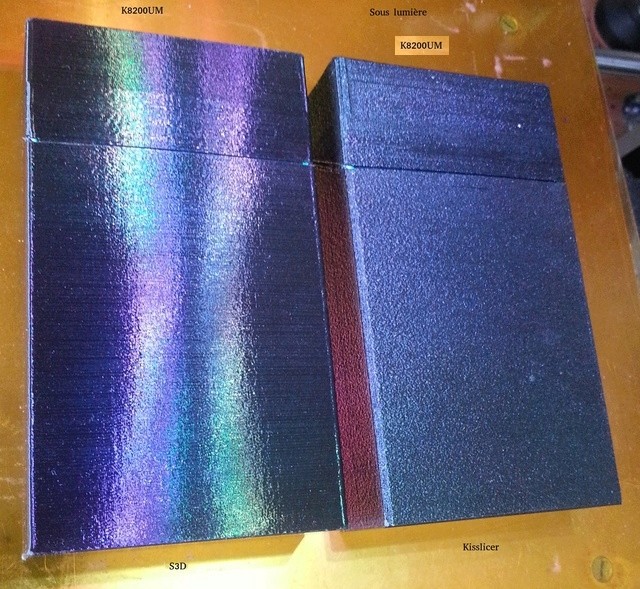
I am very pissed because at the beginning I could not test S3D on time to cancel the sale, the S3D team refused me the refund of this software when I already saw a difference in quality of finish compared to Kisslicer.
Reminder of the picture of my bad start during my first tests of S3D :
Image

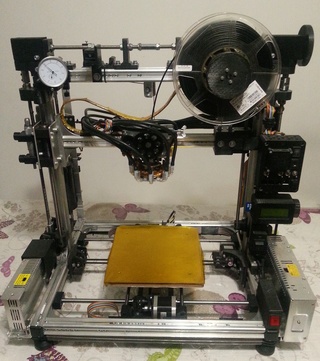
Also a comparison of use of S3D on two machines, a kit modified by me, the K8200 renamed K8200UM and a Flashforge Dreamer:
Image

This is the same STL used with exactly the same process settings, the result with one Dreamer is poor face to K8200 one poor machine...
I don't be happy with S3D and not counting the other problems reported in my other two unanswered posts.
If I do not forgive the flaws of expensive software, it is for the good of all.
If S3D works very well on machines overpriced it must be the same for all machines listed as compatible otherwise it must prevent before purchase or correct so that this software has at least the same capabilities as a freeware !!!

I would like not to waste more time and not to lose to others that the S3D team manifests itself so that at least I can use their software too expensive like a freeware !!!

OK for all ?
Printers
Dreamer Flashforge
K8200UM https://i58.servimg.com/u/f58/18/80/79/80/20170338.jpg
horst.w
Posts: 861
Joined: Fri Oct 17, 2014 5:00 pm

Re: start script not at the beginning

statis wrote:
****
I had tried in start tab :
{PREPEND "G28 \n"}
****
NOT in the Starting Script

>>>

Use / insert into the POST PROCESSING BOX below.

H.
statis
Posts: 20
Joined: Tue May 23, 2017 1:37 pm

Re: start script not at the beginning

horst.w wrote:
NOT in the Starting Script

>>>

Use / insert into the POST PROCESSING BOX below.

H.
I don't anderstand, where is POST PROCESSING BOX

thank you horst.w
Printers
Dreamer Flashforge
K8200UM https://i58.servimg.com/u/f58/18/80/79/80/20170338.jpg
User avatar
dkightley
Posts: 2405
Joined: Tue Mar 10, 2015 4:09 pm

Re: start script not at the beginning

I don't anderstand, where is POST PROCESSING BOX
Does this help??
Capture.JPG
Doug Kightley
Volunteer at the National Tramway Museum http://www.tramway.co.uk
Railway modeller and webmaster at http://www.talkingtgauge.net
24c
Posts: 21
Joined: Thu Jan 04, 2018 2:37 pm

Re: start script not at the beginning

I came across this post, and it asks a similar question to me...after the variables are printed in the S3D gcode, there is something like this placed before the Starting Script, which I think are temperature set points. Is this information added based on your printer profile, as I don't need this, because all my info is in the Starting Script. If I cut this out, my SmartReels settings are called from the EEPROMs read into the firmware.

G90
M82
M106 S0
M140 S100
M104 S230 T0
M109 S230 T0

The problem I have is a plain M104 call is sufficient as is, and my temperature control syntax doesn't relate T0 or T1 as the extruders/toolheads, but expects to see T<temperature> here instead aka

M104 S230 T230

If I didn't want to call this information, I assume I can amend the Printer Profile (mine doesn't exist yet), and if so, maybe the original poster can create a custom profile for his K8200UM, and hopefully his S3D issues will be solved. Looking at the two prints it is just a settings issue, and getting to know how the software works, which I do appreciate does take time.

Amicalement
Mike
horst.w
Posts: 861
Joined: Fri Oct 17, 2014 5:00 pm

Re: start script not at the beginning

M104 Set Extruder Temperature
Parameters
Snnn Target temperature
Example
M104 S190
Set the temperature of the current extruder to 190oC and return control to the host immediately (i.e. before that temperature has been reached by the extruder). Duet-dc42 and other firmware also supports the optional T parameter (as generated by slic3r) to specify which tool the command applies to. See also M109.

to be read : http://reprap.org/wiki/G-code

M109 in Marlin, Sprinter (ATmega port), RepRapFirmware
Set extruder heater temperature in degrees celsius and wait for this temperature to be achieved.
Example
M109 S185
RepRapFirmware also supports the optional T parameter (as generated by slic3r) to specify which tool the command refers to (see below).

M109 in MakerBot
Example
M109 S70 T0
Sets the target temperature for the current build platform
. S is the temperature to set the platform to, in degrees Celsius. T is the platform to heat.
24c
Posts: 21
Joined: Thu Jan 04, 2018 2:37 pm

Re: start script not at the beginning

Thank you horst.w

My printer does this, which is a flavour RepRap/ Marlin

M103 - First layer target temperature [S] S=Override Temperature °C . This command sets the nozzle temperature for the first layer of printing using data supplied from the reel EEPROM. [S] provides a manual override for custom temperature. e.g. M103 will set the nozzle temperature to the value stored on the reel / previous value sent, M103 S240 sets it to
240°C.

M104 - Set nozzle target temperature [S] S=Override Temperature °C . This command sets the nozzle temperature using data supplied from the reel EEPROM. [S] provides a manual override for custom temperature. e.g. M104 will set the nozzle temperature to the value stored on the reel / previous value sent, M104 S205 sets it to 205°C.


I am trying to post process the Simplify3D to mimic the gcode the firmware expects to see. I don't need the temperature related Gcode S3D is generating before the Starting Script, and wondered whether I can disable that feature set, as my firmware takes this info off the filament reels & a built in EEPROM.
statis
Posts: 20
Joined: Tue May 23, 2017 1:37 pm

Re: start script not at the beginning

Thank you horst.w
Adding {PREPEND "G28 \ n"} to the specified location works.
The sequence of {PREPEND "command \ n"} is also possible.
It's kind of strange to see a software run that way so it would be easier to do it right instead of doing it and then fix it ...
The subject https://forum.simplify3d.com/viewtopic.php?f=8&t=1959 is not clear on this point and on how to work the temperatures. The explanations given to 24c in my subject are not clearer to me.

Still in the subject https://forum.simplify3d.com/viewtopic.php?f=8&t=1959 there is a link https://github.com/whpthomas/GPX/blob/m ... le-machine. ini
This point could make S3D very interesting for me because most slicers do not adapt to the real resolution of the machine. For example the Gcode generated in displacements with too many decimals with respect to the resolution of the machine.
This famous .ini file would specify the steps_per_mm of all the axes which is very good but where is it?
I searched on my Linux at different places without finding it ...
Printers
Dreamer Flashforge
K8200UM https://i58.servimg.com/u/f58/18/80/79/80/20170338.jpg
horst.w
Posts: 861
Joined: Fri Oct 17, 2014 5:00 pm

Re: start script not at the beginning

24c wrote:...
My printer does this, which is a flavour RepRap/ Marlin
...

I'm not sure if this is relevant,
but in the Tab GCode of the Settings Window exists an option "Include M101, M102, M103 Commands"
Do you have checked ON or OFF this box?

My printers -Mankati and Anet- are also using Marlin firmware or similar and I have uncheck this box as standard setting coming from the imported profils.
I'm also not sure who is responsible for creating printer profiles. S3D or the manufactor??? Thats because the first profil for the mankati, when it was included to the printers list, had a very big bug inside when the offset for the two nozzles had muddled up +/- and the printhead crashed in the left side of housing. Faults are anytime possible!

H.
horst.w
Posts: 861
Joined: Fri Oct 17, 2014 5:00 pm

Re: start script not at the beginning

statis wrote: ...
I searched on my Linux at different places without finding it ...

On my Mankati I can change values Steps per Unit using the display menue Settings.

The Anet has no option for this, the values must be changed in the Config.h of the Marlin Settings. I reach this by using the ARDUINO-IDE-Software which includes all needed files. For the explicit trace to folder I must look myself, its a sub folder of ARDUINO.
But in RepRap.org you can find it also.

H.

"Only Example ... "
StepsPerUnit.png


Perhaps this helps:

https://www.thingiverse.com/thing:2403436

H.

Return to “Troubleshooting and Bug Reports”