Tif
Posts: 3
Joined: Sat Aug 05, 2017 11:50 am

Corrupted FFF profile?

I wanted to print something today, but s3D did really weird stuffs :
  • on the settings (see picture below), the box to chose material and quality disapeared
  • when slicing the stl file, it seems to be stuck (I let it run for some time, but didn't do anything except consumming 100% of the CPU)
  • same problem on the mac version and on the windows 10 version (only with the current profile. If I load a default profile, no issues)
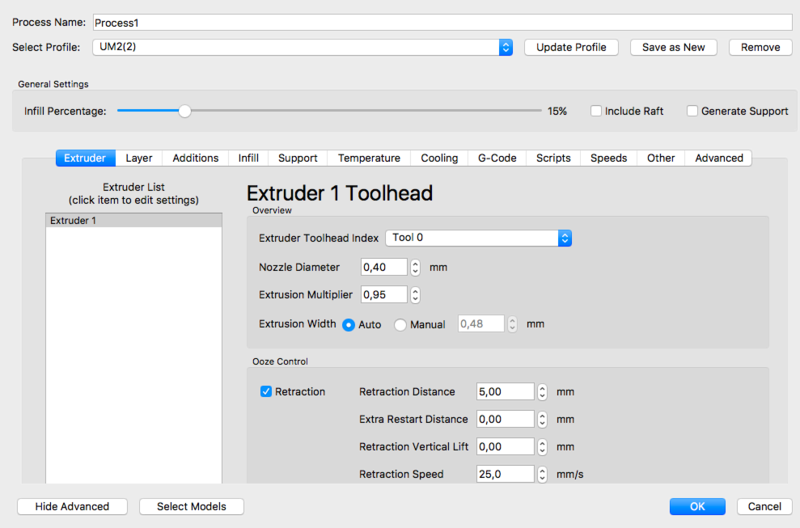
Image

This is really weird considering that it is not the first time it happened to me. Each time I must copy manually all the settings from the (I assume) corrupted profile to a new one to have it working again... I also noticed that a few weeks ago the "choose extruder" field disapeared and I don't understand because I never edited the profile by hand !

Can someone explain me If I did domething wrong?
Attachments
UM2 AIO.fff
Corrupted profile attached
(10.23 KiB) Downloaded 238 times
rrdavis
Posts: 421
Joined: Sat Dec 09, 2017 4:52 am

Re: Corrupted FFF profile?

The profile that you posted does not have any <autoConfigureMaterial> or <autoConfigureQuality> sections at the bottom, so that's why there isn't anything showing up for those options. They need to be present in the profile for them to appear.

If you go to Help > Configuration Assistant, and select the stock UM2 profile, you can export that and see the normal <autoConfigure> sections at the bottom.

It looks like there were a lot of other changes to the profile with some custom scripts and things of that nature, so it's possible some of these edits caused the issue. In particular, be careful not to use any non-ascii characters or weird symbols in your naming or scripts (∂ å π < { / \ etc). Those can cause problems.

For the issue you are having where the file isn't slicing, that's probably completely unrelated. Post your factory file and that will make it easier to see what's wrong.

Return to “Troubleshooting and Bug Reports”