I have a reprap mendel printer with Generation 6 deluxe electronics from mendel-parts. It is running a version of Marlin found in the link below.
http://www.mendel-parts.com/downloads/f ... n6-deluxe/
The baud rate in the configuration.h file is set to 115200 but I can't get creator to connect to the Gen6 board.
Has anyone had luck with a similar set up? Is there a creator log file being generated that i could take a look at when it is trying to connect?
Repetier-Host connects to the Gen6 board and is has been running flawlessly for the last year.
I have an M2 ordered but am hoping to also run the mendel with Creator.
Karl.
-
Karl_Williams
- Posts: 61
- Joined: Wed Mar 13, 2013 1:26 pm
- Contact: Website
-
Simplify3D
- Site Admin
- Posts: 310
- Joined: Sun Feb 10, 2013 8:28 pm
Re: Marlin firmware on GEN6 electronics
Karl,
I can't see any reason why Creator wouldn't work with your Reprap Mendel, or any other G-Code driven printer running Marlin for that matter! You are correct that for v1.0.3, you would need to change the baud rate to 115200 in Configuration.h. When you are trying to connect using Creator's machine control panel, are you selecting the right port? If you attempt the connection with the verbose output checked, what does it say?
If you already have the Arduino IDE on your computer, my next step might be using the Arduino serial monitor to try to connect manually so you can see what type of communication protocol is expected.
But again, I would have thought this would work out of the box, so I'm hoping it's something simpler than that.
Let us know what you find!
I can't see any reason why Creator wouldn't work with your Reprap Mendel, or any other G-Code driven printer running Marlin for that matter! You are correct that for v1.0.3, you would need to change the baud rate to 115200 in Configuration.h. When you are trying to connect using Creator's machine control panel, are you selecting the right port? If you attempt the connection with the verbose output checked, what does it say?
If you already have the Arduino IDE on your computer, my next step might be using the Arduino serial monitor to try to connect manually so you can see what type of communication protocol is expected.
But again, I would have thought this would work out of the box, so I'm hoping it's something simpler than that.
Let us know what you find!
-
Karl_Williams
- Posts: 61
- Joined: Wed Mar 13, 2013 1:26 pm
- Contact: Website
Re: Marlin firmware on GEN6 electronics
I do have the right port selected. In verbose mode it says:
Attempting connection at COM9...
Connection failed.
The operating system is Windows 7 and I tried it on two different windows 7 machines, win7 pro and win7 home. I'm wondering if it's a permissions problem because I can also connect to the gen6 board using putty without any problems. I tried running the program as administrator and still couldn't connect. Here's what I get with my putty session on COM9, 115200,8,1,N,Xon/Xoff
start
echo:Marlin: 1.0.0 RC1
echo:Configuration.h: 2012-02-25 | Author: erik
echo:Free Memory:1614 PlannerBufferBytes:1168
echo:Using Default settings:
echo:Steps per unit:
echo: M92 X40.00 Y40.00 Z3400.00 E300.00
echo:Maximum feedrates (mm/s):
echo: M203 X500.00 Y500.00 Z200.00 E500.00
echo:Maximum Acceleration (mm/s2):
echo: M201 X9000 Y9000 Z100 E10000
echo:Acceleration: S=acceleration, T=retract acceleration
echo: M204 S1000.00 T1000.00
echo:Advanced variables: S=Min feedrate (mm/s), T=Min travel feedrate (mm/s), B=minimum segment time (ms), X=maximum xY jerk (mm/s), Z=maximum Z jerk (mm/s)
echo: M205 S0.00 T0.00 B20000 X20.00 Z0.40
echo :PID settings:
echo: M301 P63.00 I2.25 D440.00
If I manually send an M105 command from putty it returns the temperatures:
ok T:22.16 B:23.00 @:0
I'll download the mac version and see if Creator on the MacBook Pro can connect to the Gen6 marlin.
Karl
Attempting connection at COM9...
Connection failed.
The operating system is Windows 7 and I tried it on two different windows 7 machines, win7 pro and win7 home. I'm wondering if it's a permissions problem because I can also connect to the gen6 board using putty without any problems. I tried running the program as administrator and still couldn't connect. Here's what I get with my putty session on COM9, 115200,8,1,N,Xon/Xoff
start
echo:Marlin: 1.0.0 RC1
echo:Configuration.h: 2012-02-25 | Author: erik
echo:Free Memory:1614 PlannerBufferBytes:1168
echo:Using Default settings:
echo:Steps per unit:
echo: M92 X40.00 Y40.00 Z3400.00 E300.00
echo:Maximum feedrates (mm/s):
echo: M203 X500.00 Y500.00 Z200.00 E500.00
echo:Maximum Acceleration (mm/s2):
echo: M201 X9000 Y9000 Z100 E10000
echo:Acceleration: S=acceleration, T=retract acceleration
echo: M204 S1000.00 T1000.00
echo:Advanced variables: S=Min feedrate (mm/s), T=Min travel feedrate (mm/s), B=minimum segment time (ms), X=maximum xY jerk (mm/s), Z=maximum Z jerk (mm/s)
echo: M205 S0.00 T0.00 B20000 X20.00 Z0.40
echo :PID settings:
echo: M301 P63.00 I2.25 D440.00
If I manually send an M105 command from putty it returns the temperatures:
ok T:22.16 B:23.00 @:0
I'll download the mac version and see if Creator on the MacBook Pro can connect to the Gen6 marlin.
Karl
-
Simplify3D
- Site Admin
- Posts: 310
- Joined: Sun Feb 10, 2013 8:28 pm
Re: Marlin firmware on GEN6 electronics
One suggestion is that only one program can access a serial port at a given time. Some communication programs actually leave their serial ports open which means no other programs can connect to them. Just a suggestion to make sure that isn't going on here.
Any reason you're all the way up to COM9? Most computers are usually on COM1/2/3/4. And I would definitely be interested if the Mac can connect. That would help us determine if it is just specific to one computer.
Any reason you're all the way up to COM9? Most computers are usually on COM1/2/3/4. And I would definitely be interested if the Mac can connect. That would help us determine if it is just specific to one computer.
-
Karl_Williams
- Posts: 61
- Joined: Wed Mar 13, 2013 1:26 pm
- Contact: Website
Re: Marlin firmware on GEN6 electronics
I tried it on the MacBook Pro and Creator could not connect to the Gen6 board. I Also installed repetier host on the MacBook and it had no problem connecting. I didn't mention that the windows 7 machines I was talking about are runing 64-bit. Not sure if that makes any difference.
What are the hard coded serial options Creator is using other than port and baud rate when it attempts to connect? Like I said before, I can connect to it with a putty terminal with 115200,8,1,N,Xon/Xoff. Does the M2 firmware use any custom settings?
Karl.
What are the hard coded serial options Creator is using other than port and baud rate when it attempts to connect? Like I said before, I can connect to it with a putty terminal with 115200,8,1,N,Xon/Xoff. Does the M2 firmware use any custom settings?
Karl.
-
Simplify3D
- Site Admin
- Posts: 310
- Joined: Sun Feb 10, 2013 8:28 pm
Re: Marlin firmware on GEN6 electronics
I'm running on a 64-bit machine here so that shouldn't make a difference. The only hard coded response that is needed is the "start" message that the firmware sends after a successful serial connection is initiated. From the looks of it, your firmware is sending that response so I see no reason why Creator wouldn't pick up on it. It also uses the same 8 data bits, 1 stop bit, and data parity none that you're using with putty.
If Creator receives the "start" message from the firmware after trying to open a new serial port, it assumes the machine successfully connected. I might try loading a new version of Marlin on there just to see if that makes a difference. Any chance you have another Arduino lying around that we could do some further troubleshooting with? The verbose option in Creator's machine control panel should show every incoming and outgoing message, so if you don't see anything show up there, something is blocking the communication.
If Creator receives the "start" message from the firmware after trying to open a new serial port, it assumes the machine successfully connected. I might try loading a new version of Marlin on there just to see if that makes a difference. Any chance you have another Arduino lying around that we could do some further troubleshooting with? The verbose option in Creator's machine control panel should show every incoming and outgoing message, so if you don't see anything show up there, something is blocking the communication.
-
Karl_Williams
- Posts: 61
- Joined: Wed Mar 13, 2013 1:26 pm
- Contact: Website
Re: Marlin firmware on GEN6 electronics
I finally got it to connect! I have to hit the reset button on the Gen6 board before it will connect. It's funny because the reset must be pushed even after cycling the power on the board. It's a mystery with that medel-parts board but I'm happy to have Creator running my mendel. I really like the jog wheel control. Thanks for being so helpful.
Attempting connection at COM1...
RECEIVED: start
Connected to machine!
SENT: G21
RECEIVED: echo:Marlin: 1.0.0 RC1
Marlin: 1.0.0 RC1
RECEIVED: echo:Configuration.h: 2012-02-25 | Author: erik
Configuration.h: 2012-02-25 | Author: erik
RECEIVED: echo:Free Memory:1614 PlannerBufferBytes:1168
Free Memory:1614 PlannerBufferBytes:1168
RECEIVED: echo:Using Default settings:
Using Default settings:
RECEIVED: echo:Steps per unit:
Steps per unit:
RECEIVED: echo: M92 X40.00 Y40.00 Z3400.00 E300.00
M92 X40.00 Y40.00 Z3400.00 E300.00
RECEIVED: echo:Maximum feedrates (mm/s):
Maximum feedrates (mm/s):
RECEIVED: echo: M203 X500.00 Y500.00 Z200.00 E500.00
M203 X500.00 Y500.00 Z200.00 E500.00
RECEIVED: echo:Maximum Acceleration (mm/s2):
Maximum Acceleration (mm/s2):
RECEIVED: echo: M201 X9000 Y9000 Z100 E10000
M201 X9000 Y9000 Z100 E10000
RECEIVED: echo:Acceleration: S=acceleration, T=retract acceleration
Acceleration: S=acceleration, T=retract acceleration
RECEIVED: echo: M204 S1000.00 T1000.00
M204 S1000.00 T1000.00
RECEIVED: echo:Advanced variables: S=Min feedrate (mm/s), T=Min travel feedrate (mm/s), B=minimum segment time (ms), X=maximum xY jerk (mm/s), Z=maximum Z jerk (mm/s)
Advanced variables: S=Min feedrate (mm/s), T=Min travel feedrate (mm/s), B=minimum segment time (ms), X=maximum xY jerk (mm/s), Z=maximum Z jerk (mm/s)
RECEIVED: echo: M205 S0.00 T0.00 B20000 X20.00 Z0.40
M205 S0.00 T0.00 B20000 X20.00 Z0.40
RECEIVED: echo:PID settings:
PID settings:
RECEIVED: echo: M301 P63.00 I2.25 D440.00
M301 P63.00 I2.25 D440.00
RECEIVED: ok
Attempting connection at COM1...
RECEIVED: start
Connected to machine!
SENT: G21
RECEIVED: echo:Marlin: 1.0.0 RC1
Marlin: 1.0.0 RC1
RECEIVED: echo:Configuration.h: 2012-02-25 | Author: erik
Configuration.h: 2012-02-25 | Author: erik
RECEIVED: echo:Free Memory:1614 PlannerBufferBytes:1168
Free Memory:1614 PlannerBufferBytes:1168
RECEIVED: echo:Using Default settings:
Using Default settings:
RECEIVED: echo:Steps per unit:
Steps per unit:
RECEIVED: echo: M92 X40.00 Y40.00 Z3400.00 E300.00
M92 X40.00 Y40.00 Z3400.00 E300.00
RECEIVED: echo:Maximum feedrates (mm/s):
Maximum feedrates (mm/s):
RECEIVED: echo: M203 X500.00 Y500.00 Z200.00 E500.00
M203 X500.00 Y500.00 Z200.00 E500.00
RECEIVED: echo:Maximum Acceleration (mm/s2):
Maximum Acceleration (mm/s2):
RECEIVED: echo: M201 X9000 Y9000 Z100 E10000
M201 X9000 Y9000 Z100 E10000
RECEIVED: echo:Acceleration: S=acceleration, T=retract acceleration
Acceleration: S=acceleration, T=retract acceleration
RECEIVED: echo: M204 S1000.00 T1000.00
M204 S1000.00 T1000.00
RECEIVED: echo:Advanced variables: S=Min feedrate (mm/s), T=Min travel feedrate (mm/s), B=minimum segment time (ms), X=maximum xY jerk (mm/s), Z=maximum Z jerk (mm/s)
Advanced variables: S=Min feedrate (mm/s), T=Min travel feedrate (mm/s), B=minimum segment time (ms), X=maximum xY jerk (mm/s), Z=maximum Z jerk (mm/s)
RECEIVED: echo: M205 S0.00 T0.00 B20000 X20.00 Z0.40
M205 S0.00 T0.00 B20000 X20.00 Z0.40
RECEIVED: echo:PID settings:
PID settings:
RECEIVED: echo: M301 P63.00 I2.25 D440.00
M301 P63.00 I2.25 D440.00
RECEIVED: ok
-
Simplify3D
- Site Admin
- Posts: 310
- Joined: Sun Feb 10, 2013 8:28 pm
Re: Marlin firmware on GEN6 electronics
Some of the older microcontrollers won't reset properly when a new serial connection is initiated, which is probably why you need to do it manually. Glad you got it working though! Let us know how the Mendel performs!
-
Karl_Williams
- Posts: 61
- Joined: Wed Mar 13, 2013 1:26 pm
- Contact: Website
Re: Marlin firmware on GEN6 electronics
The solution for getting Creator to connect to Gen 6 electronics without having to push the reset button is to open the serial port from the device manager and enable 'Set RTS On Close'.
Once that is set, Creator will be able to connect and disconnect repeatedly without having to push the reset button.
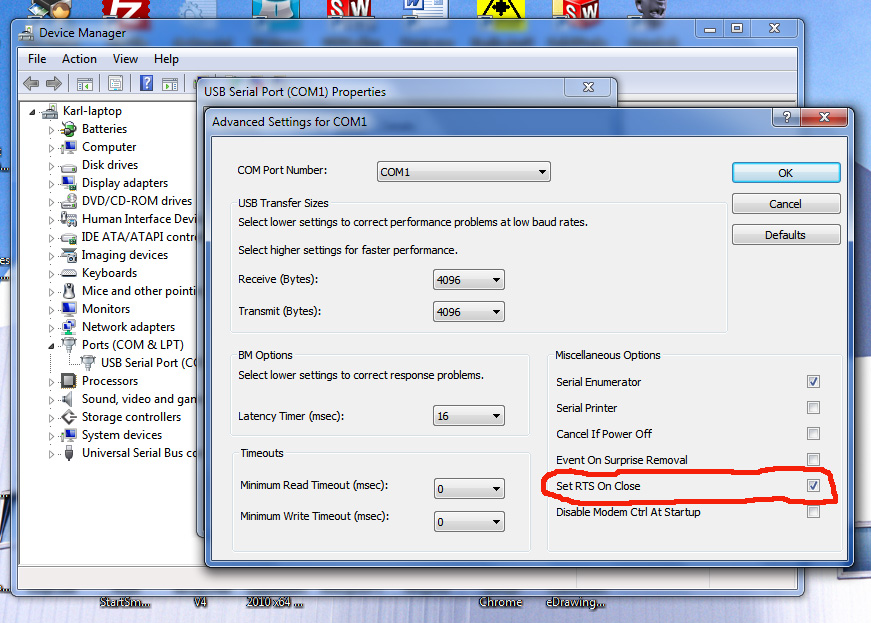
Once that is set, Creator will be able to connect and disconnect repeatedly without having to push the reset button.
-
Lateralg
- Posts: 30
- Joined: Wed Mar 20, 2013 5:10 am
- Location: Green Valley, AZ (Winter), Howell, MI (Summer)
Re: Marlin firmware on GEN6 electronics
That option doesn't appear on my Win7 Home Premium, 32 bit, SP1.Karl_Williams wrote:The solution for getting Creator to connect to Gen 6 electronics without having to push the reset button is to open the serial port from the device manager and enable 'Set RTS On Close'.
Once that is set, Creator will be able to connect and disconnect repeatedly without having to push the reset button.
Also, pushing reset button doesn't work.
Make Better Things.
Make Things Better.
Make Things Better.
