Page 3 of 7
Re: Speed Setting for small Circles
Posted: Tue Mar 15, 2016 3:18 pm
by NitroXpress
I agree with SpeedX.
Slowing down Outlines will slow down whole print significantly !
In Slic3r this is one of the most important settings for me.
For High Quality prints in Slic3r I use:
200mm/s for infill
140 mm/s for Perimeters
80mm/s for Outlines
60mm/sec for small circles.
With this settings, Slic3r makes a print 30-40% faster than with S3D by same quality.
Frank
Re: Speed Setting for small Circles
Posted: Fri Mar 18, 2016 9:24 am
by Wellcoms
Wouldn't this be solved if the speed override would be calculated from island size instead of layer size ?
Check my post here:
viewtopic.php?f=9&t=4809
Re: Speed Setting for small Circles
Posted: Fri Mar 18, 2016 12:37 pm
by NitroXpress
Not necessarily...
In your case the tower is an "island".
But if you have a 50mm cylinder with a 3mm diameter hole, the hole is not interpretet as "island".
And so a slowdown for islands has no effect.
It's no problem to print a 50mm diameter circle at 80mm/sec.
The printhead needs ~2 sec to "draw" this circle with enough time to accelerate and deccelerate.
But for a 3mm diameter circle the printhead only has 0.12 sec time.
So you need min. 0.13G acceleration to reach 80mm/sec without a "cruising speed"
Your printers mechanic is to sluggish and tend to vibrate.
Frank
Re: Slow down for sp
Posted: Sat Apr 23, 2016 12:01 pm
by Jake
DarthRevan wrote:
Thanks for the bump. You may be interested in setting up sailfish to have lower acceleration values. So that you will not need dynamic speeds at a software level. This would mean that the machine would handle much better for smaller movements instead of attempting to ramp upto full speed in a matter of mm's.
This could help you get started.
http://www.makerbot.com/sailfish/setup
You'll note the reply from Dan very early in this thread. This is best solved by the slicers, which have far more processing power and the ability to analyze the geometry of the entire model.
Sure you could slow down the acceleration, but this effects the entire print, every print. It would be much better for the slicer to dynamically determine that a small curve needs to be slowed down.
This thread probably could be moved to the "feature requests" forum now that it exists.
Decreasing speed of small perimeters
Posted: Mon May 16, 2016 12:39 am
by arkcol
Hello!
Add decreasing speed of small perimeters like in Slic3r.
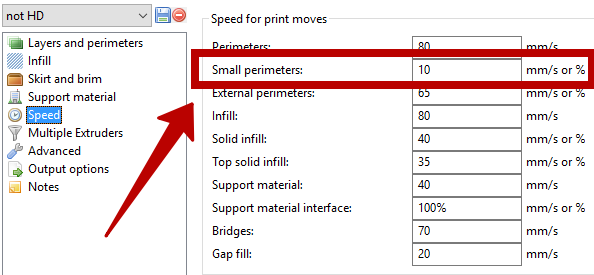
I have detail with small holes but speed of outline perimeters is very high for printing these.

Result of printing little holes with big speed.

Re: Decreasing speed of small perimeters
Posted: Thu May 26, 2016 3:38 pm
by BaronWilliams
+1,
This Small Perimeters feature is one advantage Slic3r has over Simplify3D.
This is handy, especially when printing very fast. For long straight lines, you can print quite rapidly without much quality issues. But for sharp corners or small radius turns, printing fast can easily cause quality issues.
It would nice to one up Slic3r and allow the user to configure what size is considered a "small feature".
Re: Decreasing speed of small perimeters
Posted: Fri May 27, 2016 2:49 pm
by Luke321
I made a script which does just that:
https://www.dropbox.com/s/gnx004p8zm86n ... r.zip?dl=0
You need python 3.4.2
Create a shortcut to the python.exe and main.py from my postprocessor: C:\Python34\python.exe C:\....\main.py
Place the shortcut in the same folder as your .gcode file
Start the postprocessor and typ in the name of your file without .gcode
The program closes after finishing
enjoy!
In the postprocessor.py you can change the current minimum length value and speed.
Currently everything under 20mm is slowed down to 10mm/s and hardcoded

This was made in a hurry but it worked with dozens of prints.
Hope it is useful to some!
Re: Decreasing speed of small perimeters
Posted: Fri May 27, 2016 3:16 pm
by arkcol
Luke321 wrote:I made a script which does just that:
https://www.dropbox.com/s/gnx004p8zm86n ... r.zip?dl=0
You need python 3.4.2
Create a shortcut to the python.exe and main.py from my postprocessor: C:\Python34\python.exe C:\....\main.py
Place the shortcut in the same folder as your .gcode file
Start the postprocessor and typ in the name of your file without .gcode
The program closes after finishing
enjoy!
In the postprocessor.py you can change the current minimum length value and speed.
Currently everything under 20mm is slowed down to 10mm/s and hardcoded
This was made in a hurry but it worked with dozens of prints.
Hope it is useful to some!

Thanks! I hope it work. I'm going test it in the near days.
Re: Decreasing speed of small perimeters
Posted: Fri Jun 03, 2016 3:03 pm
by arkcol
Luke321 wrote:I made a script which does just that:
https://www.dropbox.com/s/gnx004p8zm86n ... r.zip?dl=0
You need python 3.4.2
Create a shortcut to the python.exe and main.py from my postprocessor: C:\Python34\python.exe C:\....\main.py
Place the shortcut in the same folder as your .gcode file
Start the postprocessor and typ in the name of your file without .gcode
The program closes after finishing
enjoy!
In the postprocessor.py you can change the current minimum length value and speed.
Currently everything under 20mm is slowed down to 10mm/s and hardcoded
This was made in a hurry but it worked with dozens of prints.
Hope it is useful to some!
How to edit speed's value? (in your example this is 10 mm/s)
I found how to edit small perimeter's length.
Re: Decreasing speed of small perimeters
Posted: Tue Jun 07, 2016 1:53 am
by Luke321
it's the line after the if which checks the length... block[].f = 612 I think is the standard value (612 mm/min) I used this so I could check the gcode for the changed values because 600 is my standard first layer speed.