Page 1 of 1
Bridging fan speed override not working ?
Posted: Mon Jul 16, 2018 11:53 pm
by mr.sneezy
Using the Bridging Fan Speed Override setting in the 'Cooling' tab is not working for me.
However if I set the cooling on for the whole print the fan does run, so the physical fan control is fine...
I'm printing in ABS so using fan during normal layer printing is not what I want (it causes weak layer bonding and other issues), I just want the fan on during a bridging layer and setting this 'on' in cooling is not achieving that.
I also notice in the model layer speed preview that the bridging layer colour is the same as the normal layers below, indicating same speed applied as them.
Anyone else got this issue or issues ?
Using S3D V4.0.1
Re: Bridging fan speed override not working ?
Posted: Wed Jul 18, 2018 7:30 pm
by mr.sneezy
OK, there is more to this. After getting more familiar with the GUI and the layers view, I now see that S3D is not detecting the first layer of a hollow box as a bridging layer. It's being detected as a first solid layer.
How can I manually set a layer to use bridging settings if the software doesn't do it ?
Re: Bridging fan speed override not working ?
Posted: Thu Jul 19, 2018 7:41 am
by wirlybird
Pictures would help.
When you say the first layer of a hollow box do you mean the actual first layer on the bed?
Also in the bridging settings you can adjust the unsupported area threshold to set how big an unsupported or "bridging" area needs to be before it is actually considered a bridge area by the slicer.
Re: Bridging fan speed override not working ?
Posted: Fri Jul 20, 2018 9:58 pm
by mr.sneezy
Yes, you are right a screen dump of the sliced view would help. When I'm near the S3D PC again I'll do that.
The x,y, dimensions of the box are 40x40mm, so 1600 square mm in area, way above the minimum default threshold setting of 50 square mm (which I also made just 5 to see if it changed anything).
Anyway, the image next week might help more...
Re: Bridging fan speed override not working ?
Posted: Mon Jul 23, 2018 2:55 am
by mr.sneezy
Three images.
First shows the model on the layer before the top of the hollow box is printed.
The second one shows where I thought it should be a 'bridging layer' but is shown (and printed) as a solid layer.
I expected S3D to highlight that layer in yellow not green
And final one of how Silc3r PE bridging detection handled it and shows it as a bridging layer (which is what I used to use before buying S3D).
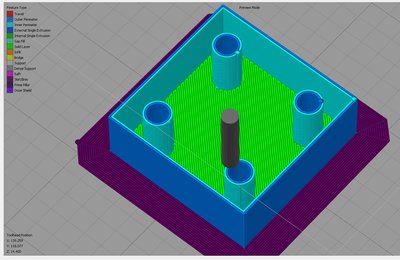
- Last hollow layer.
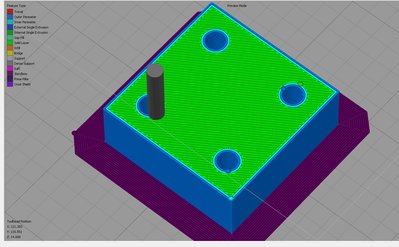
- Bridging layer should be this one ?
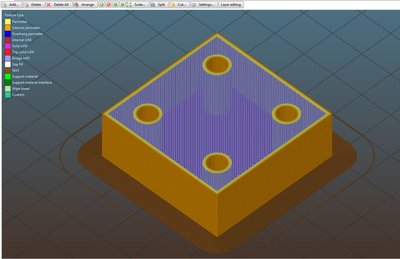
- Tested bridging detection with Slic3r PE software.
Re: Bridging fan speed override not working ?
Posted: Mon Jul 23, 2018 5:26 am
by blackbird2016
In my opinion for S3D these are not bridges but top solid layers.
Just the missing infill makes them to bridges, kind of.
But S3D does not recognize it as bridge for the 1st solid top layer is no outer surface.
btw. Even if there were a reason to print completely without infill,
one could increase the amount of top solid layers to get an even surface.
Or better use either multiple processes with different fan speeds or
determine a fan speed per layer using the print preview.
S3D recognizing that "interior-bridge" as a bridge and applying the fan speeds would be preferably, though....
Re: Bridging fan speed override not working ?
Posted: Mon Jul 23, 2018 10:28 pm
by mr.sneezy
Thanks,
There are sometimes reasons for me to build a hollow box with no infill, and I won't debate that reason online. I used to do it regularly for projects using free Slic3r PE though, and just expected the paid app to do same or better.
Re: Bridging fan speed override not working ?
Posted: Wed Aug 15, 2018 4:39 pm
by DarthRevan
Could you attach your model you're having trouble with? The unsupported area threshold setting works for me to detect designed internal cavities as bridging sections.