lower initial x/y axis speed when changing direction
I was wondering if there is a possibility to lower the initial speed whenever the print head changes direction in order to prevent the machine from shaking. If the machine would start moving from 0% to full speed within the first 10mm or so and slow down again before the next change in direction the whole process would be a lot smoother and more precise. Are there any settings to achieve this without lowering the overall printing speed or general x/y axis movement? Thanks for any idea.
-
KeyboardWarrior

- Posts: 480
- Joined: Thu Jun 19, 2014 5:02 pm
Re: lower initial x/y axis speed when changing direction
Welcome to the forum friend,
This would be a setting in your printers Firmware though and you're probably looking for the Jerk command from what you describe of your machine shaking. As the quote below shows, this will still slow down your printing speeds, but not the overall, just the changes in velocity. The Jerk setting only effects the XY plane, the Z increasing/decreasing won't cause significant movement. Jerk is an important setting since not all velocity changes are the same in terms of stress/shaking for your machine. If you're going 10 mm/sec in the X direction and then to 10 mm/sec in the opposite direction is a lot different than a slight shift in angle.
Source:http://www.repetier.com/documentation/r ... tallation/
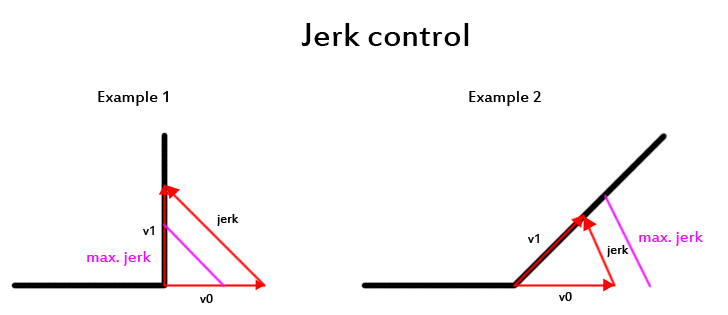
This would be a setting in your printers Firmware though and you're probably looking for the Jerk command from what you describe of your machine shaking. As the quote below shows, this will still slow down your printing speeds, but not the overall, just the changes in velocity. The Jerk setting only effects the XY plane, the Z increasing/decreasing won't cause significant movement. Jerk is an important setting since not all velocity changes are the same in terms of stress/shaking for your machine. If you're going 10 mm/sec in the X direction and then to 10 mm/sec in the opposite direction is a lot different than a slight shift in angle.
Source:http://www.repetier.com/documentation/r ... tallation/
Jerk is what makes your printer shake. It is a speed difference between two moves, which can be reached without acceleration. So why do you want jerk and what does it influence? The first thing it influences is the starting speed. It is 50% of the allowed jerk. So if you have a jerk of 20, the first move will start with 10mm/s. The other thing jerk controls is the join speed for consecutive segments. In the figure above you see two examples. The jerk is the difference of the two speeds. Example 1 shows a jerk, that is higher then allowed. In this case, the path planner will reduce the speed to match exactly the maximum allowed speed. Example 2 has a lower directional change, so the jerk is within allowed limits and the planner allows a full speed move through the edge. The jerk is set these two values:
#define MAX_JERK 20.0
#define MAX_ZJERK 0.3
MAX_JERK is for x/y axis moves and MAX_ZJERK for moves in Z direction.
You want high jerk values, because
printing time is reduced.
print shows less blobs.
You want low jerk values, because
it causes less mechanical stress to your printer.
moves are smoother.
filament has better adhesion at directional changes.
reduces printer noise.
you loose steps with higher values.
You see, it is balance between your personal priorities. The only simple thing is z-jerk, which has nearly no influence. It only reduces the time for z-moves, but has no effect on quality.
Re: lower initial x/y axis speed when changing direction
I haven't been back to the forum for a while but I just wanted to say thanks for the reply. Seems like this is the way to solve the problem. I'll have a look at the firmware as soon as I have some spare time.
