[BUG] Fusion360 loft missing wall
Posted: Tue Apr 02, 2019 1:25 pm
The loft feature of Fusion360 creates a lot of problems for Simplify3D.
Here's an example of a missing wall:

The wall is there and is 2mm thick:
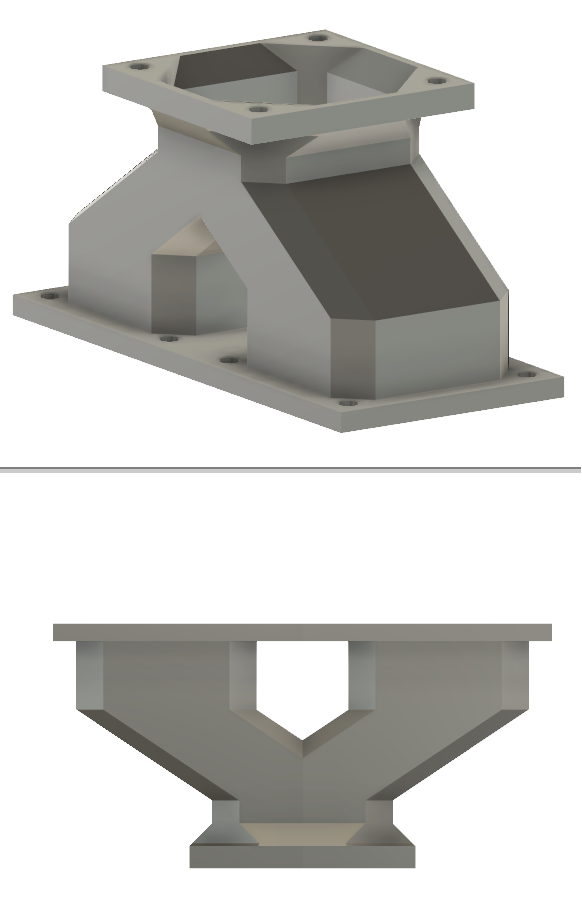

Best STL Viewer:

Export settings:
https://i.ibb.co/x3vbTh2/exportsettings.png
STL file: http://s000.tinyupload.com/index.php?fi ... 7241221736
f3d file: http://s000.tinyupload.com/index.php?fi ... 8662170198
FFF settings: 4 perimeters, 0.4mm nozzle, 0.4mm extrusion width
Fusion360: v2.0.5519
Simplify3D: 4.1.0
Here's an example of a missing wall:
The wall is there and is 2mm thick:
Best STL Viewer:
Export settings:
https://i.ibb.co/x3vbTh2/exportsettings.png

STL file: http://s000.tinyupload.com/index.php?fi ... 7241221736
f3d file: http://s000.tinyupload.com/index.php?fi ... 8662170198
FFF settings: 4 perimeters, 0.4mm nozzle, 0.4mm extrusion width
Fusion360: v2.0.5519
Simplify3D: 4.1.0