Page 1 of 1
There is a bug in the display
Posted: Sat Dec 24, 2022 10:22 am
by tazman33
There is a bug in the display of the tray in the processes
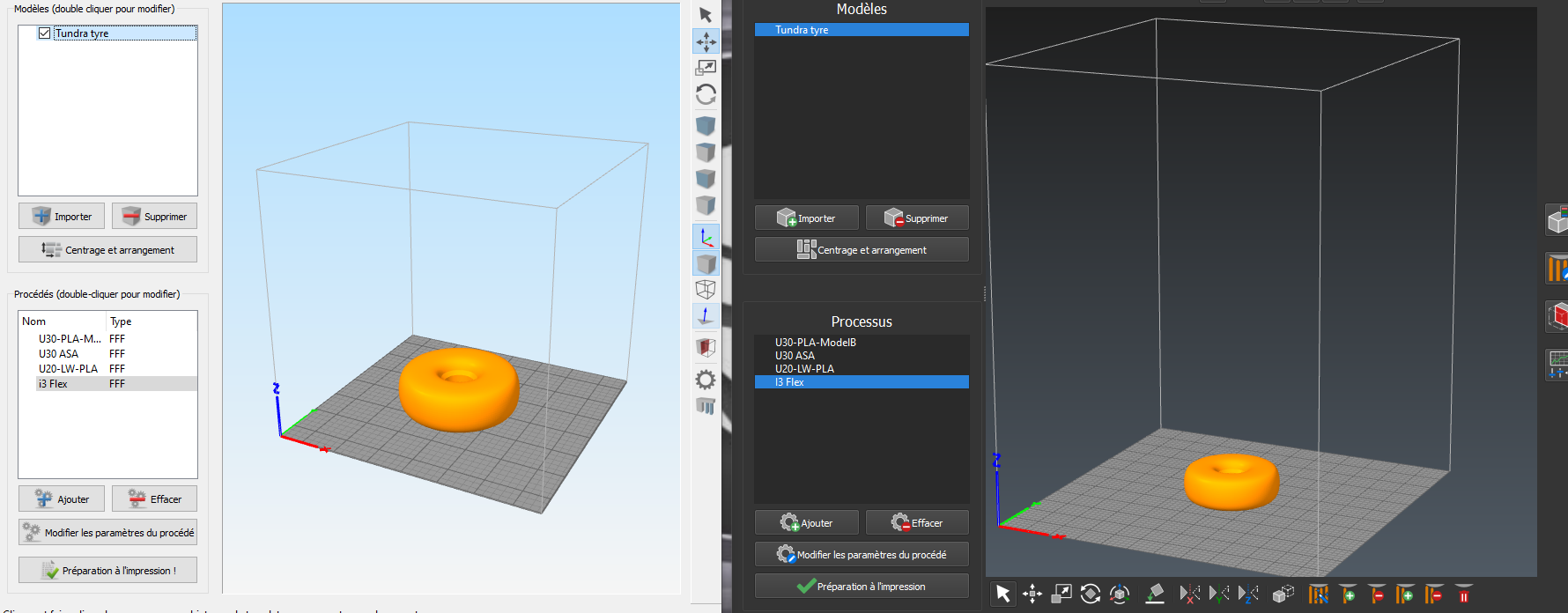
When I use a 300x300x400 printer I have the correct tray on the screen but if I use another printer that is 200x200x200 Simplify stays on the 300x300x400 tray and when I print a part with the 200x200x200 printer the part is not in the centre but at the end!
Left Simplify V4 - right Simplify V5
Re: There is a bug in the display
Posted: Sat Dec 24, 2022 3:07 pm
by S3D-Jason
Typically, I think if you are only printing a single part you would only have 1 process in the list to the left.
It looks like you have 4 separate processes. If those processes are just there to store some settings for the future, how about saving those as profiles (just click the Save As New button)? That way S3D will store those permanently in the profile management system and you don't have to always have dozens of processes in the list.
Re: There is a bug in the display
Posted: Sun Dec 25, 2022 5:13 am
by tazman33
Thank you for your reply.
I use the profiles and several printers at the same time, I had found a comfort of work with the V4 but with the V5 the display of the size of the tray from one process to another does not work anymore

On V5 I don't like the automatic selection of processes when requesting slicing

See you soon
Re: There is a bug in the display
Posted: Mon Dec 26, 2022 3:43 pm
by gearsawe
it would appear the build volume is only visually controlled by the first process and ignored by the rest.
it will not update the size if you re-order the processes. update only seems to happen after have you have adjusted the print volume in the process of the which ever is first.
It would be probably be best to have two set of profiles for each machine then you could just switch between them as needed.
I too sometime have multiple process for a single part such as for ironing, support and the model. but don't have multiple printers.
