Page 1 of 2
thin-wall feature strange behavior
Posted: Wed Dec 10, 2014 7:57 pm
by phil.t
I believe the new thin-wall feature in version 2.2.0 is doing something strange with one of my prints. I wonder if anyone else can reproduce this.
I have a small box with a wall thickness of 1.852 mm (see attached STL). I set my process to the defaults for the Printrbot Simple Metal, except I set the extrusion width to 0.50 mm. When I slice it, most of the wall of the box looks like the following:
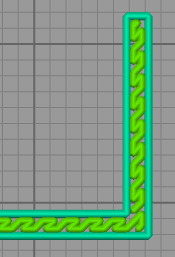
- normal-fill.png (14.61 KiB) Viewed 6053 times
Which is correct, but some of the wall (specifically in the layers with the handle holes), look like this:

- over-filled.png (14.59 KiB) Viewed 6053 times
Notice that it has somewhat double-infilled the wall (I'm showing a single layer in the above screenshots). When I print it, that part of the wall is bumped out and rough, due to the extra infill (I have a picture I can provide, but I've reached the max attachments for this message). There seems to be a range of extrusion width values that result in this issue, while others do not. Turning off the thin-wall infill makes it just use perimeters which does work like the previous version.
Any thoughts on what might be going on?
Thanks,
Phil
Re: thin-wall feature strange behavior
Posted: Sat Dec 13, 2014 4:04 pm
by jimc
i tried it and im not getting that at all. my slice looks like your top pic on all layers. try slightly changing the infill percentage and see if that helps it. sometimes there is just some strange bit of math that goes on and just a slight change in infill and or layer height with correct the issue.
Re: thin-wall feature strange behavior
Posted: Mon Dec 15, 2014 7:44 am
by AndersE
I also tried this, i also get a double zigzag in the upper part as Phil.
Also only on those layers as the handleholes. Over the holes it looks normal again.
I had this on some other models also, but i thought it was normal.
When playing animation, it first print perimeter. then infills first half, then perimeter + infill the next, and then forgets it has already infilled the first and does it again slightly shifted.
Re: thin-wall feature strange behavior
Posted: Mon Dec 15, 2014 8:59 am
by phil.t
Thanks for giving it a try - I'm glad to hear I'm not the only person seeing this. It has since happened on a couple of my other models.
By the way, here's what that tray looks like printed:
That area of double-infill stands out as a bumpy band in the print, so I'm pretty sure it must be abnormal to be filled like that.
For now, on another model at least, I've turned up the "Allowed Perimeter Overlap" percent under the Thin Wall settings until it stops using infill on the walls and uses additional perimeters (essentially making the wall solid). Note that this seems to be different than picking "Only use Perimeters for thin walls" setting, which for my model created a single perimeter and a empty inside wall space.
Thanks,
Phil
Re: thin-wall feature strange behavior
Posted: Mon Dec 15, 2014 10:13 pm
by jimc
i have a model here that i print tons of all the time and its alot like yours. a thin wall with a hole in it. im not sure if this is the same issue your having but when i slice it i dont get double infill on the same layer but i do get infill that punches out over the perimeter. i have tried tweaking every setting imaginable and i cant get it to go away. it does move around though. if i tweak setting it can punch out the front as in the pic or sometimes the back. if i duplicate the exact same model, there is no pattern. some are front, some back. very odd. i am not 100% sure but i believe this did this in the last version as well. on the outside of my actual print it looks similar to yours....just less of it. i get little dashes just like in the preview. i only get it with a single perimeter wall
Re: thin-wall feature strange behavior
Posted: Wed Dec 17, 2014 5:28 am
by JoeJ
Post some factory files. This doesn't seem to happen on every model, so it might be setup specific...
Re: thin-wall feature strange behavior
Posted: Thu Dec 18, 2014 2:43 pm
by ReneeCelDesigns
Hi all,
I have also noticed this issue since the update 2.2.0. it can be resolved with some tweaking of the setting (cant remember what exactly). However it is rather strange! and needs correcting.
Thank you for some of the amazing features in 2.2.0 like the dense support near the part... as that is simply superb.
Re: thin-wall feature strange behavior
Posted: Sun Dec 21, 2014 12:25 pm
by chrisham
After 4 hours of printing I had to cancel my print because I noticed most of my thin walls were getting messed up. The symptoms looked the same as described in earlier posts. If any of the devs is interested, I can provide a factory and G-Code file showing this problem. It just seems like gap infills are printed twice at the same spots resulting in bad shapes, but I didn't notice this with older versions of S3D (2.1.2 e.g.).
Well, after some testing I've come up with a temporary work-around: Set "Extrusion width" to manual and define it to be the same as your nozzle diameter, then this problem seems to disappear. I'm really looking foward to a fix, guys!
Re: thin-wall feature strange behavior
Posted: Sun Dec 21, 2014 1:09 pm
by JoeJ
I still haven't been able to get this to happen. Please post your factory files. Ideally, it is always best of you post the simplest factory file that you can with the simplest model possible that will recreate the problem. That just helps to remove all of the other confounding effects.
Re: thin-wall feature strange behavior
Posted: Sun Dec 21, 2014 2:10 pm
by chrisham
No problem, just tell me your e-mail address and I'll send you my factory file. I'd send you a PM, but I'm not allowed to do that yet.