Page 1 of 1
S3D fails to build bridge supports
Posted: Sat May 27, 2023 2:03 am
by humax
It seems like S3D fails to build Bridge supports in some areas so it leaves a huge air gap(!??) instead of creating dense support right up to the overhangs. If S3D doesn't recognise those areas as Bridges then why doesn't it build the supports properly when they should reach the material they have to support? It looks like a software bug of S3D as there is no any logic in what S3D doing so.
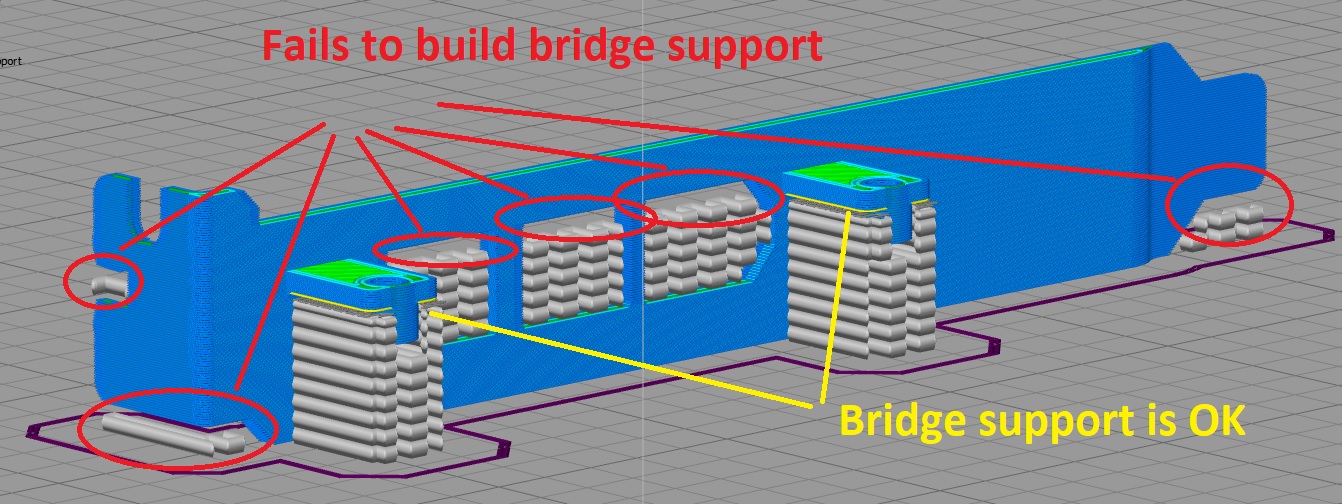
Any thoughts?
Re: S3D fails to build bridge supports
Posted: Mon May 29, 2023 12:18 am
by jfkansas
Maybe change your minimum bridge area. Those spots are pretty small so it probably isn't applying bridge settings with the default value. It is under Other tab, Unsupported Area Threshold. Change it to like 10, or less.
Re: S3D fails to build bridge supports
Posted: Mon May 29, 2023 6:11 am
by humax
change your minimum bridge area.
Unfortunately reducing the parameter you mentioned just helped to highlight the Bridges but had no effect to the supports at all for some reason.

So eventually I've managed to rebuild the supports properly by bringing the "Combined Support Layers" value down from 7 to 1.

Regardless of the previously affected overhang areas are still not highlighted as "Bridges" either the supports under them are built as they should.

Re: S3D fails to build bridge supports
Posted: Mon May 29, 2023 1:52 pm
by jfkansas
Didn't see you had combined set to 7 which isn't really feasible. No more than 2 combined usually. A small area doesn't have to have bridging. That preview looks correct. Looks like that bridging area you are referring to is mostly outlines, there is a setting to bridge outlines also.