Page 1 of 1
print on void
Posted: Wed May 13, 2015 2:07 pm
by jeand
Hello,
Strange behavior of the s3d. Maybe it's normal.
I print with 0% infill. Object can stay itself with shell only (cat statue)
At a certain layer, s3d try to print on void (inside object). Take a look on follow pictures.

- 001

- 002
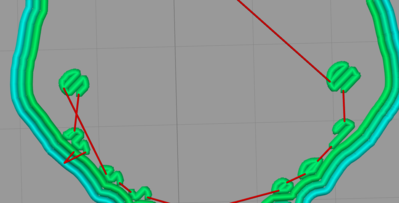
- 003
Is there somewhere a parameter where we can force 'inside' support ?
Please, don't suggest fill the object because even with 20%, it doesn't work, and I don't want infill !
Thanks in advance.
Jean
ps: Cura can anticipate this and build a support few 'support layers' before.
Re: print on void
Posted: Wed May 13, 2015 6:01 pm
by KeyboardWarrior
Can you post a factory file for this part? File-->Save Factory File As
Re: print on void
Posted: Wed May 13, 2015 6:15 pm
by jeand
Re: print on void
Posted: Thu May 14, 2015 11:30 am
by dkightley
S3D doesn't create internal support. You have to specify that yourself.
Looking at your print, the trouble starts around layer 568...and then is okay until around layer 820. At both these points, you'll need to have some infill to allow something for the newly extruded plastic to sit on. This doesn't mean you need infill all the way from the bottom, as you can have different process with differing infill %ages.
I've never done this sort of print myself, so I am not going to offer suggestions of how much infill is needed and for how many layers. Perhaps others can offer this sort of advice.....
Re: print on void
Posted: Thu May 14, 2015 11:46 am
by jeand
Thank you Doug.
I really appreciate your help.
I think I 'll return to use Repetier-Host with Cura.
I've purchased s3d thinking it's best to generate support than Cura.
Seems it's not the case.
Re: print on void
Posted: Fri May 15, 2015 2:25 am
by horst.w
I can't follow your problem.
Importing the factory file the object seams totally ok. It has a boddem, it is hollow and the support only appaers outside for the cat's head.
Use Cross Section you can see it. Prove the position of object on the printtable.
horst, GER
Re: print on void
Posted: Fri May 15, 2015 6:46 pm
by dkightley
Hi Horst
Look at the slicer simulation at layer 568 and you'll see there's a depression in the back of the neck where there's printing over fresh air. The same happens where there's a depression inside each of the ears at around layer 820. The model needs some infill to support these depressions.
The issue Jean is raising is that S3D only creates external support, ie support material external to the shell of the model.....and doesn't look to create support "inside" the shell where the infill has been specified as zero.
Not sure if this might be a subject for discussion as a possible enhancement......
Re: print on void
Posted: Sat May 16, 2015 4:05 pm
by horst.w
Ok, I have found it now.
I'm agree to your analysis and suggestions to solve the problem.
But let we him do as he want to do this. Perhaps he is able to break through physical limits. With 0.75 Multiplier it will be difficult enough.
Greetings
Horst, GER