Page 1 of 1
huge blob at start..nozzle wipe?
Posted: Mon May 18, 2015 10:19 pm
by KTMDirtFace
Is there a way to change this..
I'm using Simplify3d and a modified replicator 2 ( i have added heated build platform and sailfish firmware ).
Anyway it all works great exept simplify 3d before every print likes to extrude a huge blob in the front left corner before the print starts..what ends up happening is this blob gets stuck to the nozzle and drug around screwing the print up. how do I make it stop doing this blob..or change it back to how makerware does it where it draws a line down the front of the buildplatform to clean the nozzle.
I'm sure i'm just missing an options somewhere. Generally what i have to do is get my little scraper out and make sure i stick it between the nozzle and the initial front left corner blob so that i can break the blob off before it gets dragged across the first layer.
Thanks
Re: huge blob at start..nozzle wipe?
Posted: Mon May 18, 2015 11:47 pm
by jimc
this is part of your start script. you can change that right in your process. what is supposed to happen is the nozzle is supposed to move just off the build platform, extrude 20mm then use the edge of the bed to scrape or wipe the hanging string from the nozzle. not sure why yours is extruding onto the bed but that can be modified in your script.
Re: huge blob at start..nozzle wipe?
Posted: Tue May 19, 2015 1:00 am
by KTMDirtFace
Oh ok thanks. my guess is seeing how I have the bottleworks build plate on my Replicator2 it may be a slightly diffrent size. Thanks makes sense now I'll try to modify my build platform size settings that would probably be the real fix?
Re: huge blob at start..nozzle wipe?
Posted: Tue May 19, 2015 9:52 am
by mvansomeren
jimc wrote:this is part of your start script. you can change that right in your process. what is supposed to happen is the nozzle is supposed to move just off the build platform, extrude 20mm then use the edge of the bed to scrape or wipe the hanging string from the nozzle. not sure why yours is extruding onto the bed but that can be modified in your script.
Just to add to that info, the start functionallity depends on the printer you are using. For example, on the Rostock MAX V2 which is a delta printer with a circular printbed, it prints about a 6" straight line towards the edge of the printbed, pauses and then moves to the proper position and begins printing the skirt (if you have that turned on).
Re: huge blob at start..nozzle wipe?
Posted: Wed May 20, 2015 8:28 am
by KTMDirtFace
Thanks i'm using a Replicator 2 that has been modified with an added heated build platform.
Looks like this
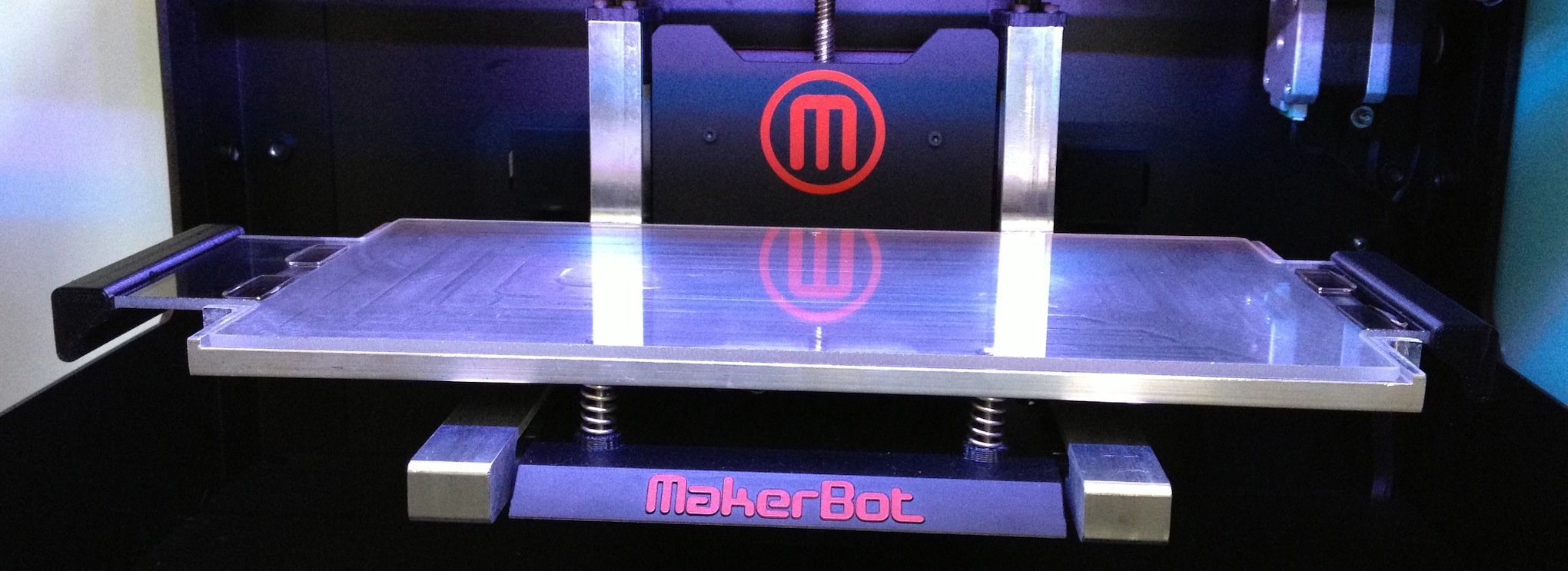
The blob ends up on the aluminum just off the edge of the glass.
I just measured the glass and its 285mm x 150mm. Simplifys replicator 2 with Heated Build Plate preset is 280x150 so thats fine.
I think I found the spot in the startup script where it says "move head off build platform" and there is a -x and -y offset. I think if I just increase those it should fix the problem? Its not next to me right now to test it
Re: huge blob at start..nozzle wipe?
Posted: Wed May 20, 2015 9:53 am
by dkightley
The line in the start gcode file is:
G1 X-145 Y-75 Z30 F9000 ; move to wait position off table
The x co-ordinate -145 is 5mm off the standard Makerbot bed.
If you increase this negative figure by an appropriate amount (eg to -155) , you should end up with the nozzle ooze just off the frame of your bed.
You could even tweak the y cordinate so that the ooze point is in one of the oblong holes in the side of the bed....rather than the wipe being over the metal frame. If they're holes, of course...the photo is not 100% clear now I take a second look!!

Re: huge blob at start..nozzle wipe?
Posted: Wed May 20, 2015 11:46 am
by KTMDirtFace
Thank you! That should fix me up thanks.
No those are not holes they are rare earth magnets that are glued to the glass it holds the glass onto the build platform. the glass is cradled in to the metal part.

Re: huge blob at start..nozzle wipe?
Posted: Wed May 20, 2015 7:12 pm
by dkightley
Where do all the ads say I should have gone to????

Its obvious they're magnets now I know what they are.

Re: huge blob at start..nozzle wipe?
Posted: Wed May 20, 2015 10:30 pm
by KTMDirtFace
-155 worked perfectly thank you.