Page 1 of 2
Strange, parts disappear in the preview and print mode
Posted: Fri Jun 19, 2015 12:09 pm
by Janet
I've been experiencing the following issue. I've made a design, simple straight forward chair and when the model is loaded all is fine
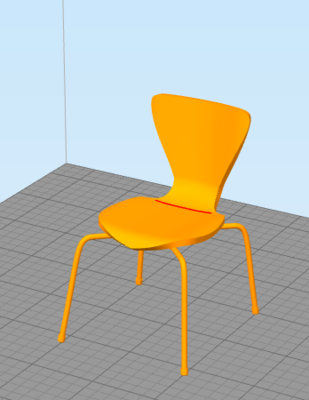
- Parts are not missing
,
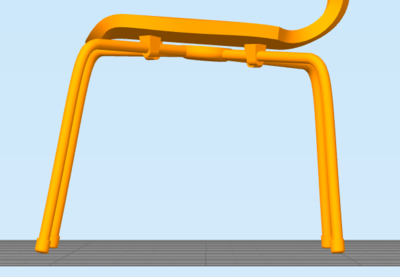
- All the legs are fine
. No strange things to see. However when I go to the print preview screen parts of the legs have disappeared
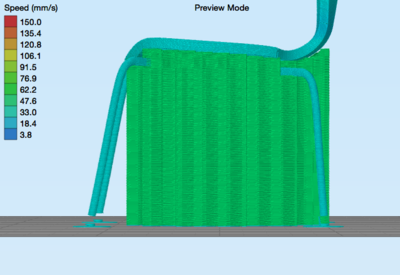
- The parts are missing
, and the printer won't print those parts either. I've done all the obvious things, reloaded the model, checked for Non manifold edges and there aren't any in this particular area. And the file is working and printing in Cura. Please help, I'm stuck in my solutions.
Re: Strange, parts disappear in the preview and print mode
Posted: Fri Jun 19, 2015 12:30 pm
by KeyboardWarrior
I think it would be really helpful if you could post the 3D model up as an attachment.
Re: Strange, parts disappear in the preview and print mode
Posted: Fri Jun 19, 2015 2:49 pm
by Janet
This is the 3D file. Works fine in Cura.
Re: Strange, parts disappear in the preview and print mode
Posted: Fri Jun 19, 2015 3:49 pm
by KC_703
Most likely a problem with the STL. In the main screen, use the "Repair" ->"Identify Non-Manifold Edges".
Other times I've seen this is when printing walls thinner than the set extrusion width.
Re: Strange, parts disappear in the preview and print mode
Posted: Sat Jun 20, 2015 12:17 am
by jimc
if you want us to check it please post the factory file. as kc said that is always 1 of 2 things. a problem with the model OR that part of the model has walls that are too thin to print. when it comes thin walls s3d will print and keep everything in spec to the original model. s3d knows if your nozzle is .4 and the wall is thinner than it cant be printed to spec. cura and some others ignore the model and print it even though its not correct which is fine for some things i guess but not for most.
Re: Strange, parts disappear in the preview and print mode
Posted: Sat Jun 20, 2015 5:30 am
by Janet
I've checked the Non Manifold edges and there aren't any in that particular part of the model. Also used repair however the missing part stays. I'll check the wall thickness, suppose that is the best possibility, thanks!
KC_703 wrote:Most likely a problem with the STL. In the main screen, use the "Repair" ->"Identify Non-Manifold Edges".
Other times I've seen this is when printing walls thinner than the set extrusion width.
Re: Strange, parts disappear in the preview and print mode
Posted: Sat Jun 20, 2015 5:39 am
by Janet
Thanks changing the nozzle size in does the trick, in the software, but how can I print the part using S3D? What settings can be tweaked to get it right? Still I have .4 nozzle, I suppose setting it to .2 won't get a right print. Or am I wrong? In the attachment is the FFF file
.
jimc wrote:if you want us to check it please post the factory file. as kc said that is always 1 of 2 things. a problem with the model OR that part of the model has walls that are too thin to print. when it comes thin walls s3d will print and keep everything in spec to the original model. s3d knows if your nozzle is .4 and the wall is thinner than it cant be printed to spec. cura and some others ignore the model and print it even though its not correct which is fine for some things i guess but not for most.
Re: Strange, parts disappear in the preview and print mode
Posted: Sat Jun 20, 2015 6:07 am
by Janet
Problem solved! Indeed changing the design, bigger legs does the trick. Good to know that wall thickness can be an issue in S3D. Perhaps some calculation formulas for this? Or an error display in the software? That could be very helpful. Topic can be closed. Thanks for all your help and support.
Let's start printing!
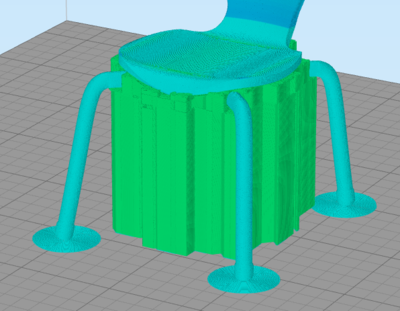
- Bigger legs
Re: Strange, parts disappear in the preview and print mode
Posted: Sat Jun 20, 2015 8:46 am
by jimc
When your modeling a design for print just keep in mind that any wall has an inner and outer surface. Thats 2 extrusions. Your extrusion width setting is actually what controls if it prints or not so try not to make walls in your parts smaller than the width x2. There is a little fudge factor there because s3d will overlap the inner and outer surfaces to make a thinner wall but there is really only so far it can go. In the advanced tab there is your thin wall overlap setting. With a .4 nozzle avoid walls lass than .8mm
Re: Strange, parts disappear in the preview and print mode
Posted: Sat Jun 20, 2015 3:45 pm
by dkightley
I think the issue with the original model of the chair was the fact that the feet were not part of the same mesh as the legs....and as the slicer is not capable of dealing correctly with interlacing but separate meshes by turning the adjoining surfaces of the included overlap into an external face, resulting in an internal void leaving a wall thickness between the void and the outside surface of less than the extrusion thickness...and nothing printed!
If the model is run through the Netfabb online repair surface, then the meshes would be merged ....and the feet would be printed properly.
This is an issue I have all of the time with the CAD software I use. None of the tools in 3DS can help.