Page 1 of 1
Firmware Macros reseting themselves?
Posted: Wed Jun 24, 2015 10:04 pm
by mushoo
Has anyone else noticed this? I'm thinking MAYBE it has something to do with the 'update firmware configuration' checkbox in a printing profile, but my Custom Commands Macros keep (seemingly randomly) unwriting themselves. It's very frustrating!
Re: Firmware Macros reseting themselves?
Posted: Thu Jun 25, 2015 1:29 am
by smartavionics
Yes, I have seen this. I haven't yet worked out what makes them disappear!
Re: Firmware Macros reseting themselves?
Posted: Thu Jun 25, 2015 8:17 am
by JoeJ
I have a feeling that's because you have the firmware overrides enabled. That means that every time you load or save that profile, it is going to override your firmware settings to make them match whatever option you have in the "firmware type" drop down list on the G-Code tab. So I have a feeling there are 2 easy ways to accomplish what you want.
First option is that if all of your printers use the same type of firmware (i.e. all Marlin/Repetier or all MakerBot/Sailfish), then I would just go ahead and disable the firmware overrides. Then you can customize things however you want and they won't go away.
Second option would be best for people who have multiple printers that have different firmware types and require different macro commands. In this case, I would recommend making a unique firmware configuration for each printer that requires custom macros. For example, let's say I have a Prusa i3 and a Printrbot Metal Simple, both of which I want to use different macro commands. To do this, go to tools --> firmware configuration, and then setup everything correctly for the first printer. When you're done, click Export and save the .frm file somewhere safe on your hard drive. Then do the same for the second printer. Now, click "Edit Process Settings" and load the profile for the first printer. If you click on the G-Code tab, you can see that your custom firmware has now been added to the "Firmware type" drop down list. So you can actually load a completely custom firmware configuration for each printer with completely custom macros

I attached a screenshot that shows you what option 2 would look like
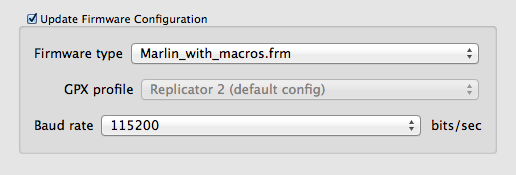
- FirmwareConfigWithMacros.png (11.28 KiB) Viewed 10230 times
Re: Firmware Macros reseting themselves?
Posted: Mon Jun 29, 2015 11:59 pm
by mushoo
Sorry, I don't seem to be getting email notifications anymore with the new forum.
Anyway, yes, I have 'update firmware settings' unchecked - that was the first thing I tried. Still happens, seemingly randomly after printing, reslicing, or just reopening the machine control panel sometimes. (i'm not entirely sure when it happens, just that sometimes they 'go away.' Sometimes the machine control panel will even still have the correct names, but not the actual gcode linked to them!)
Re: Firmware Macros reseting themselves?
Posted: Fri Jul 17, 2015 9:04 am
by Karl_Williams
I was having the same problem yesterday with a new install of 3.0.1 on a Windows 8 machine that hasn't had any previous versions installed. They would disappear and revert back to the default macro when the program was restarted and sometimes when closing and reopening the machine control panel. They seem to be sticking now and the only thing I did was to set the baud rate to 250000 and uncheck the 'update firmware configuration' box under the G-code tab in the FFF settings. Maybe making a change there forces a save to the macro setting?
Re: Firmware Macros reseting themselves?
Posted: Tue Sep 15, 2015 12:36 pm
by fns720
Same here on Mac OS X 10.10. My macros are disappearing when I press Emergency Stop button.
Re: Firmware Macros reseting themselves?
Posted: Tue Sep 15, 2015 3:12 pm
by JoeJ
This is answered above. Just follow those instructions:
viewtopic.php?f=9&t=2833#p11941
Re: Firmware Macros reseting themselves?
Posted: Mon Nov 02, 2015 10:06 am
by tonyvan22
