[ADDED] Avoid Crossing Outlines - Include Supports Moves
I'm trying to use the "avoid crossing outline for travel movements" option under advanced to prevent my nozzle from crossing over the perimeter shell when moving from one support area to the next but it doesn't seem to have any effect. Even if I set the Maximum Allowed Detour Factor to 100.0 it still crosses right over my outlines and creates a nasty artifact on my surface. From what I've been told this feature doesn't take effect when doing supports but it would be really great to have an option for this.
Re: Avoid Crossing Outlines - Include Supports Moves
I'm 100 % with you.
-
bray.christopher
- Posts: 62
- Joined: Fri Jun 19, 2015 11:24 pm
Re: Avoid Crossing Outlines - Include Supports Moves
Yes please!
I have had the same problem.
I have had the same problem.
-
bray.christopher
- Posts: 62
- Joined: Fri Jun 19, 2015 11:24 pm
Re: Avoid Crossing Outlines - Include Supports Moves
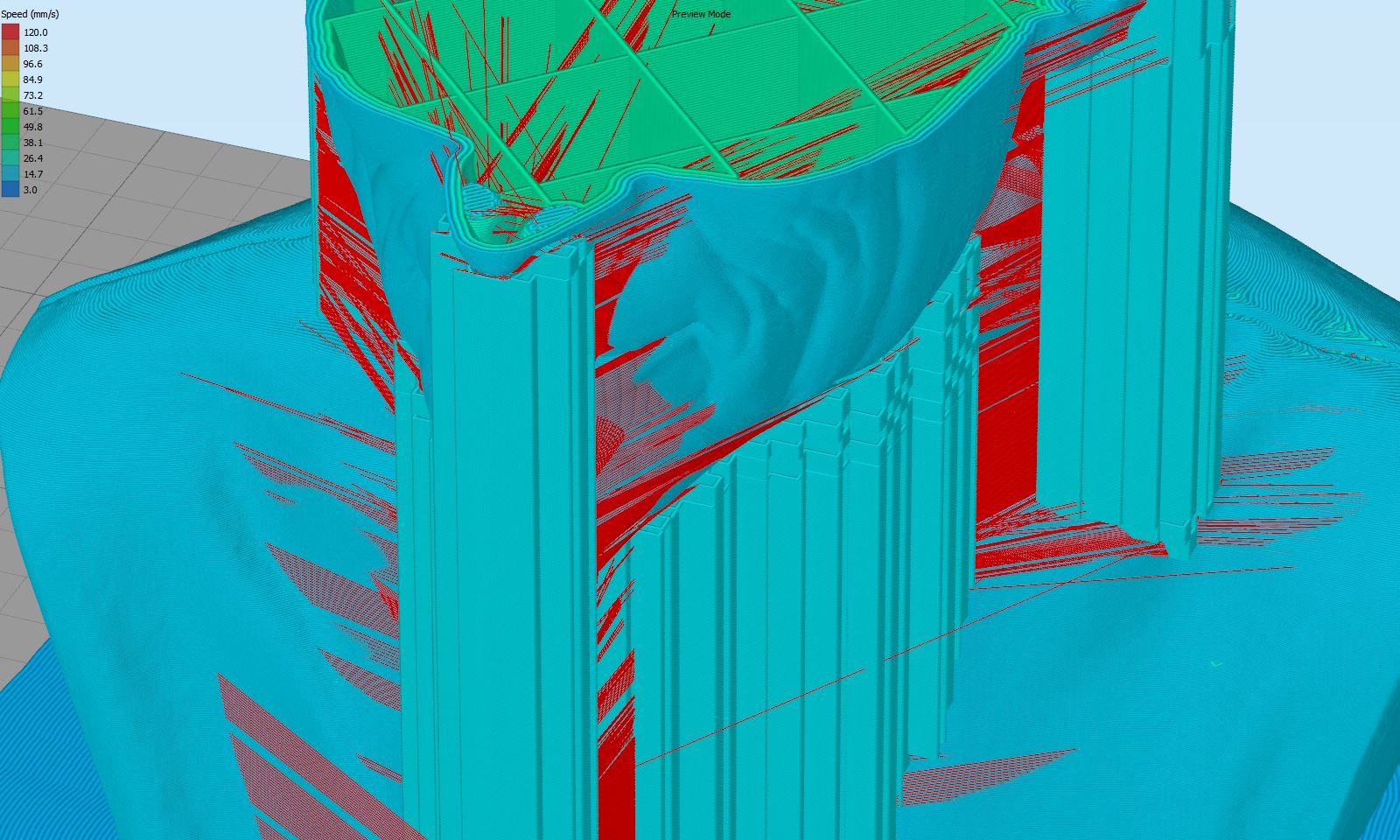
I have the "Avoid Crossing Outline" set to 10.
All of those red lines are travels for printing the support material.
Re: Avoid Crossing Outlines - Include Supports Moves
YES PLEASE! This would be a great feature. I see why it doesn't work (because the support isn't attached - the toolhead must cross the outline). The fix would be to allow the the travel too and from supports to only cross the outline one time only. Please make this happen!!
Re: Avoid Crossing Outlines - Include Supports Moves
++
gcodestat integrates with Simplify3D and allow you to
Calculate print time accurately (acceleration, max speed, junction deviation all taken into consideration)
Embed M117 codes into G-Code
Upload your G-Code directly to Octoprint
open source and unlicence
Calculate print time accurately (acceleration, max speed, junction deviation all taken into consideration)
Embed M117 codes into G-Code
Upload your G-Code directly to Octoprint
open source and unlicence
Re: Avoid Crossing Outlines - Include Supports Moves
I've been trying to work around this and keep running into dead ends. Even when I design my own supports, and have those supports touching the the main body of my part, I get travel moves across my part. I propose an easy fix. When "Avoid Crossing Outlines" is selected, then limit travel moves between bodies to the shortest possible path. This shortcoming of the Simplify 3D is keeping me from thousands of dollars, because many parts I'd like to make are unsuitable for market with travel scars on the surface. I'd be eternally grateful if this was included in the next upgrade.
- Attachments
-
Re: Avoid Crossing Outlines - Include Supports Moves
I am happy to say that this has been greatly improved in version 4.0. If you go to the Advanced tab and enable the "Avoid crossing outline for travel movements" setting, this now works much better with support structures.
For example, if moving from the inside of the object to the supports, the extruder will stay within the model as long as possible and make the shortest move possible to the support structures. This can greatly reduce the amount of stringing at the start of the support structures.
If the extruder does need to cross over the model to get to another support structure, the software will try to find the best path within the model so that the extruder can get as close as possible to the next set of support structures before exiting the model. This should greatly improve many of the examples posted above.
For example, if moving from the inside of the object to the supports, the extruder will stay within the model as long as possible and make the shortest move possible to the support structures. This can greatly reduce the amount of stringing at the start of the support structures.
If the extruder does need to cross over the model to get to another support structure, the software will try to find the best path within the model so that the extruder can get as close as possible to the next set of support structures before exiting the model. This should greatly improve many of the examples posted above.
