Page 1 of 1
Infill underspeed
Posted: Wed Jul 22, 2015 5:40 pm
by jefish
To prevent the XY motors from skipping, or the printer from shaking itself apart when filling thin wall gaps, Simplify needs to add an Infill Speed setting. Combining the master print speed with infill speed is baaaaad.
Re: Infill underspeed
Posted: Sun Jul 26, 2015 1:35 am
by ddnguyen_278
Is that what it's doing when it wiggles back and forth violently around the perimeters? Yah it's probably not doing the printer any good.
Re: Infill underspeed
Posted: Mon Jul 27, 2015 6:55 am
by JoeJ
It already has a dedicated setting for the infill speed. Just adjust the default printing speed and then use all of the other modifiers to adjust things like perimeter speeds, support speeds, outer solid layer speeds, etc.
Re: Infill underspeed
Posted: Wed Jul 29, 2015 7:24 pm
by jefish
Your suggested workaround is to change the default print speed to, say, 10mm/s, then jack all other "underspeed" settings to 150% or more? That seems pretty counter-intuitive, especially since Simplify appears to be the only slicer out there without an Infill Speed option.
Re: Infill underspeed
Posted: Thu Jul 30, 2015 5:16 am
by JoeJ
There are a bunch of settings that are used to slow down different section of your print relative to a single reference speed. For example, outline underspeed or first layer speed adjustments. These all adjust the speed compared to a single reference speed.
Because the infill is usually printed faster than any other part of the print, it was chosen as the reference speed which all other factors are controlled from. This way if you switch to a new material that requires much slower extrusion, you can change this one single reference speed, and all of your other adjustments will still be working properly (such as printing the perimeters at 50% of the infill speed).
So there's good reason for why they chose the infill speed to be the reference speed
Re: Infill underspeed
Posted: Thu Jul 30, 2015 12:41 pm
by jefish
Infill, being one of the few activities which is prone to many rapid direction changes in small confined areas, seems to need a specific speed modifier. But that's my opinion. I guess the only option is to take the master speed down to 10-20mm/s and overcrank the rest.
Re: Infill underspeed
Posted: Sat Aug 01, 2015 5:28 am
by bapro
I agree with jefish. But wouldn´t it be enough with a lower infill speed for small segments.
Re: Infill underspeed
Posted: Mon Aug 03, 2015 9:43 am
by wfcook
jefish wrote:To prevent the XY motors from skipping, or the printer from shaking itself apart when filling thin wall gaps, Simplify needs to add an Infill Speed setting. Combining the master print speed with infill speed is baaaaad.
I suggested in
another thread a way around this. What if S3D were to use a gap fill strategy like Slic3r's, which allows it to dynamically adjust the extrusion width to fill thin wall gaps? Here is an example; for a part I print a lot of S3D generates this:
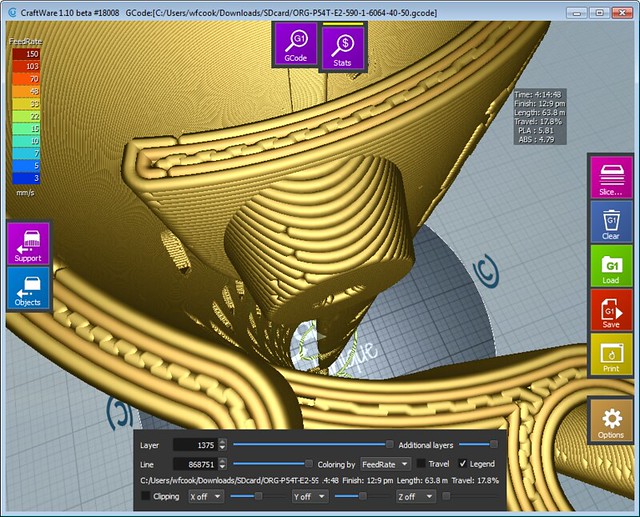
And this is what Slic3r does:
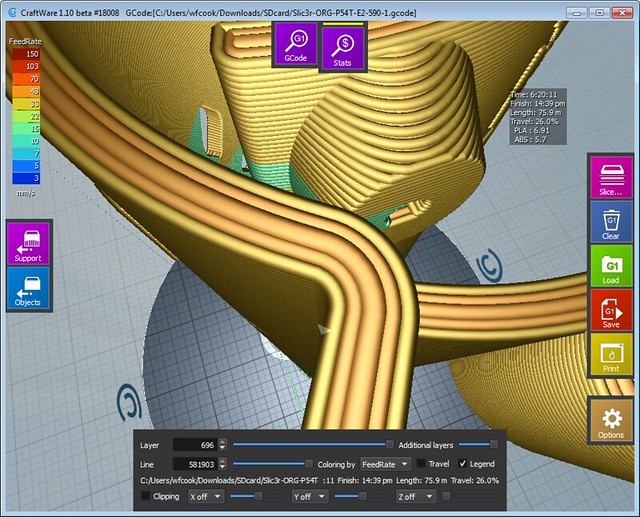
The part produced by Slic3er prints more smoothly and more quickly, but suffers only because Slic3r lacks a couple of good anti-ooze features. Slic3r's gap fill is in this case superior (note: it works better in Slic3r 1.2.7 than in 1.2.9 because they appear to have introduced a bug).
I do agree that it would be nice to have more control over speeds of various things. Slic3r, for all its faults (and they are many) does give more control over the print.
S3D is still the better slicer, but this feature would be very nice.