Page 1 of 1
Missing infill
Posted: Sat Aug 22, 2015 9:50 pm
by SvenZHB
Hello,
often the infill is missing: I tried to set the minimum infill length to 0.01 mm without success. The attachment shows the problem. Any ideas?
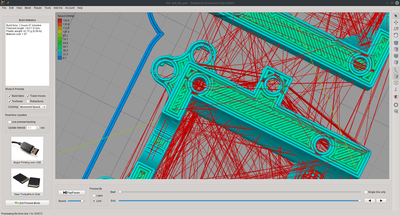
- Infill is missing
Kind regards,
Sven
Re: Missing infill
Posted: Sun Aug 23, 2015 8:10 pm
by KeyboardWarrior
SvenZHB wrote:Hello,
often the infill is missing: I tried to set the minimum infill length to 0.01 mm without success. The attachment shows the problem. Any ideas?
Infill.png
Kind regards,
Sven
Can you post a factory file? That would help a bunch.
I think Gap Fill, Outline Overlap and Extrusion Width would be some key settings to look into though off the top of my head.
Re: Missing infill
Posted: Mon Aug 24, 2015 12:09 am
by SvenZHB
Okay here is the factory file. Because of this problem I increased the overlap to 20% and the problem was fixed at rectangular areas (normal rectangle). I played also with the GAP fill parameter.
Are the .STL included? Do you need them, too?
http://www.thingiverse.com/thing:978911
Kind regards,
Sven
Re: Missing infill
Posted: Mon Aug 24, 2015 7:47 am
by JoeJ
Two things
- You have coasting turned on with a fairly large value of 1.5mm. This means that there will be many places in this print where there will be a 1.5mm gap in the preview, because you have essentially turned off the extruder 1.5mm early. That doesn't necessarily mean there will be a 1.5mm gap in real-life, but if the gap is too big at the end of the loops on your real prints where the extruder would be coasting, then decrease this value. I lowered it to 0.5mm.
- I had much better results myself after changing the "outline overlap" to 35%. This setting is on the Infill tab.
Re: Missing infill
Posted: Mon Aug 24, 2015 11:31 am
by SvenZHB
Thanks for the reply.
- Using 0.5mm for the coasting I still got blobs so I slightly increased it to that value. Other users of my printer (one firmware developer) even uses 2.0mm.
- Slic3r for example fills this whole completely, so why Simplify3D cannot do that? There is a perimeter missing @simplify3D. But I am getting much blobs using Slic3r so as the quality is much better I would like to use Simplify3D if it is anyhow possible.
- I have no problems with the how I should say area regarding the most inner perimeter and the infill. 15% was indeed too low but for my printer 20% seems to bee okay.
Re: Missing infill
Posted: Mon Aug 24, 2015 3:11 pm
by SvenZHB
I can solve the problem if I set the Extrusion width to 0.5 mm - the nozzle size. At Slic3r I use the same setting as my manufacturer provided configuration files for Slic3r.
I have two questions: Why I have an auto function if it does not work? Does this mean that the thickness of thinner walls (consisting only of perimeters) can be only a multiple of the Extrusion width?