singhm29
Posts: 41
Joined: Thu Feb 12, 2015 11:52 pm

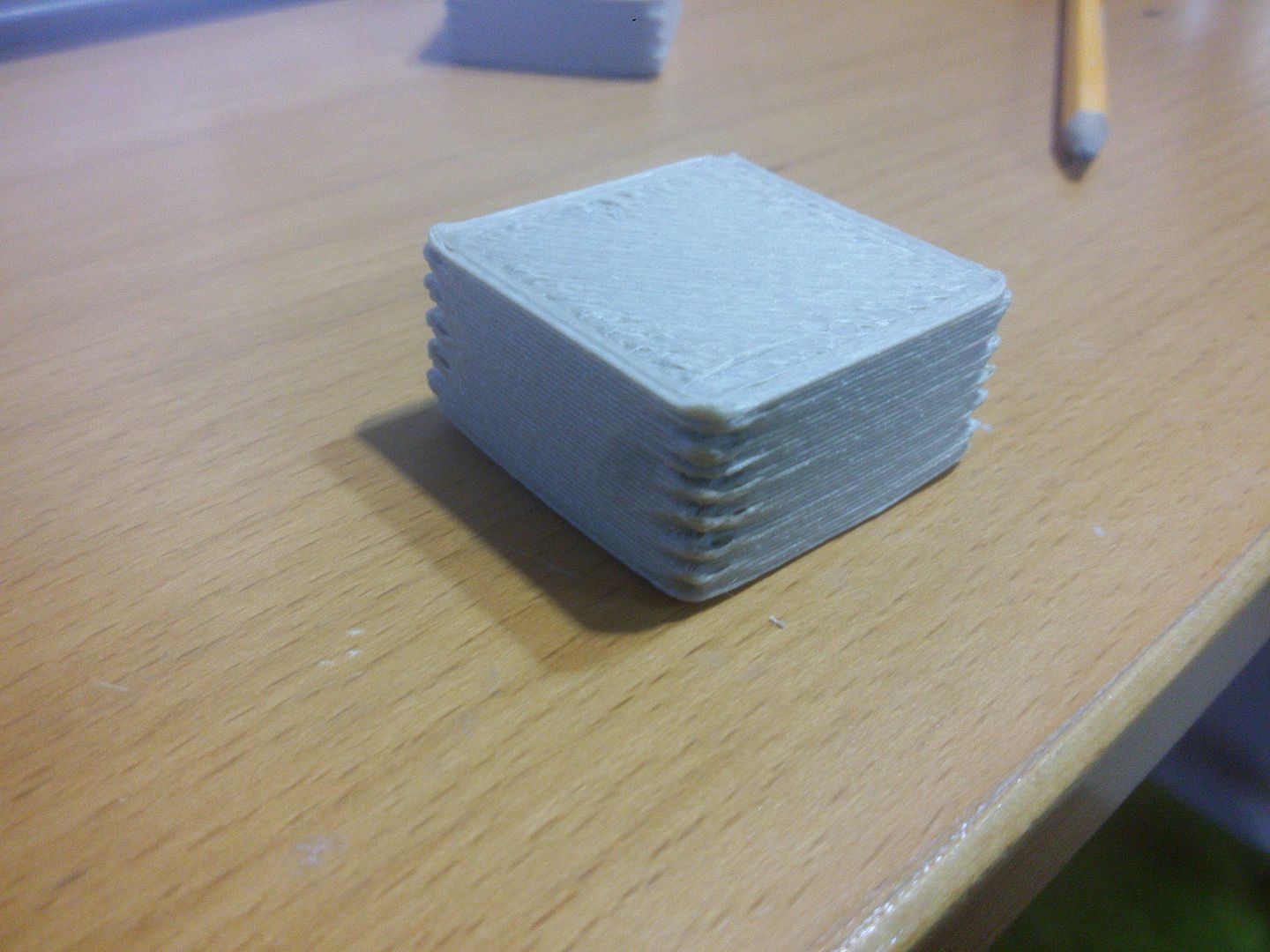
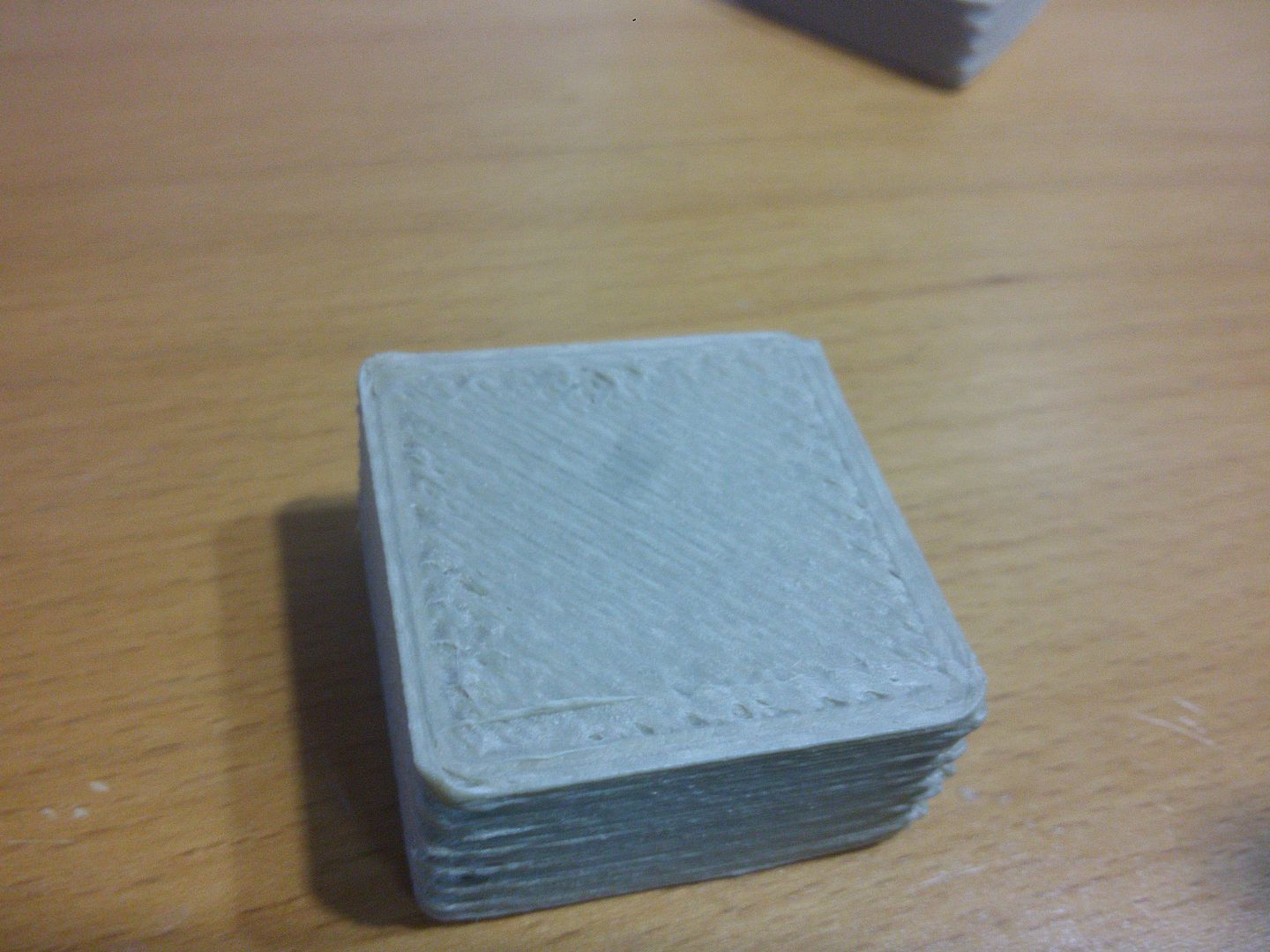
Gap between infill and perimiter

Hey everyone,

I recently changed extruders to a 1.2mm E3D volcano setup. Decided to start up S3D again and give it a go as im not having much luck with slic3r and off the bat S3D gave me a better print for a calibration cube. However im still having big issues with gaps between the infill and perimeters and the perimeter walls also seeming like they have a gap.

This is what I started with on the first print.
Printed with 1.2mm nozzle
-.9 layer height
-1.2mm extrusion width
-200 degrees celsius
-extrusion multiplier of .9
-speed 1800mm/min, outline underspeed 50%, solid infill underpeed 80%
-3 layers top and bottom
-2 perimeters
-infill 20%
-outline overlap 15%
-infill extrusion width 100%
-min infill length 5mm
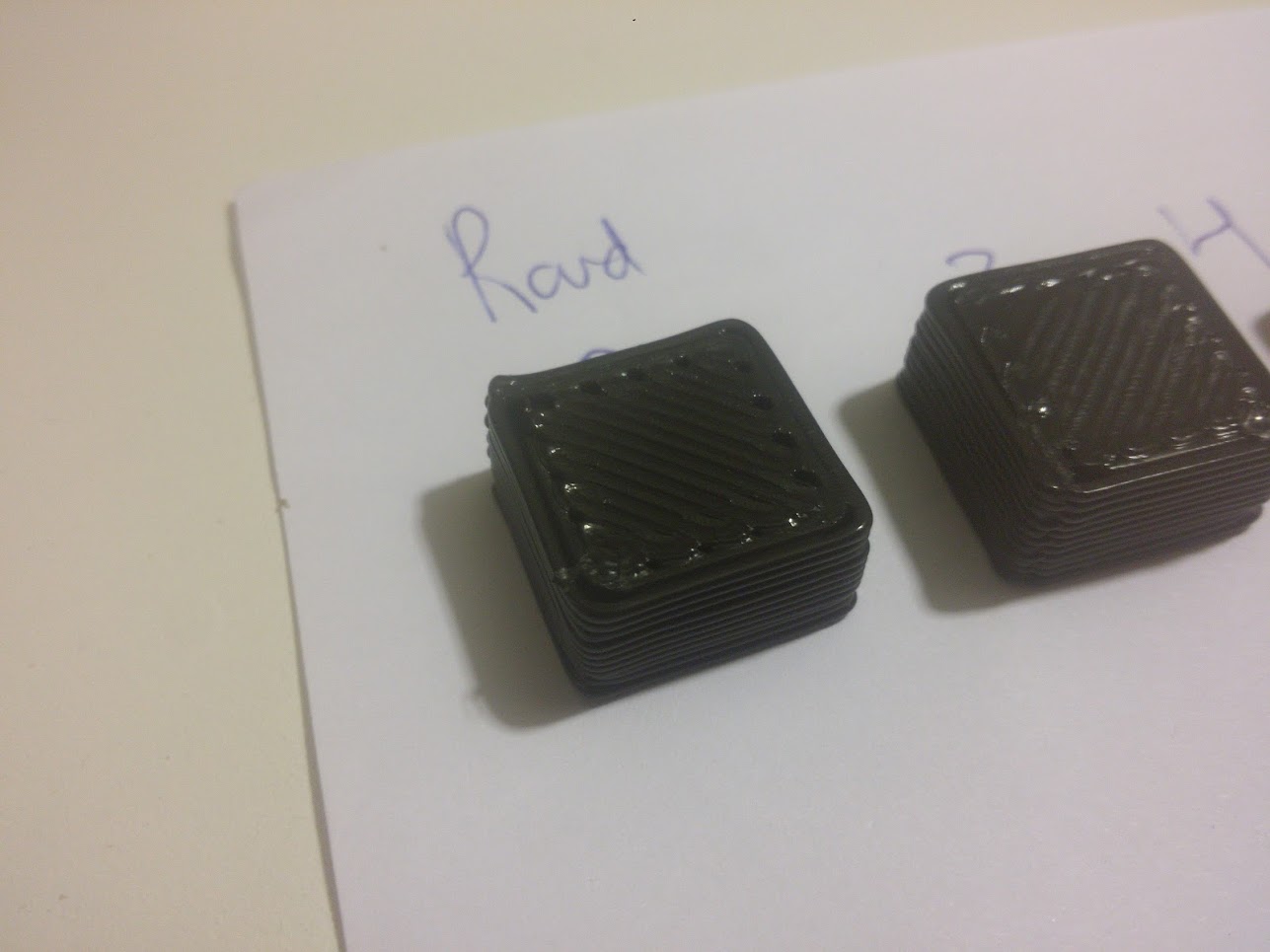
Image

Since that point I have gotten it a bit better by changing. you can notice in the bottom left of the second image a hole, these holes lead almost all the way through the cube as if when the printer goes to any corner it always leaves a gap on the turn.
-205 degrees celsius from 200
-outline overlap 70%
-min infill length .1mm (I did this thinking that it was purposely skipping the corners because of thsi setting)
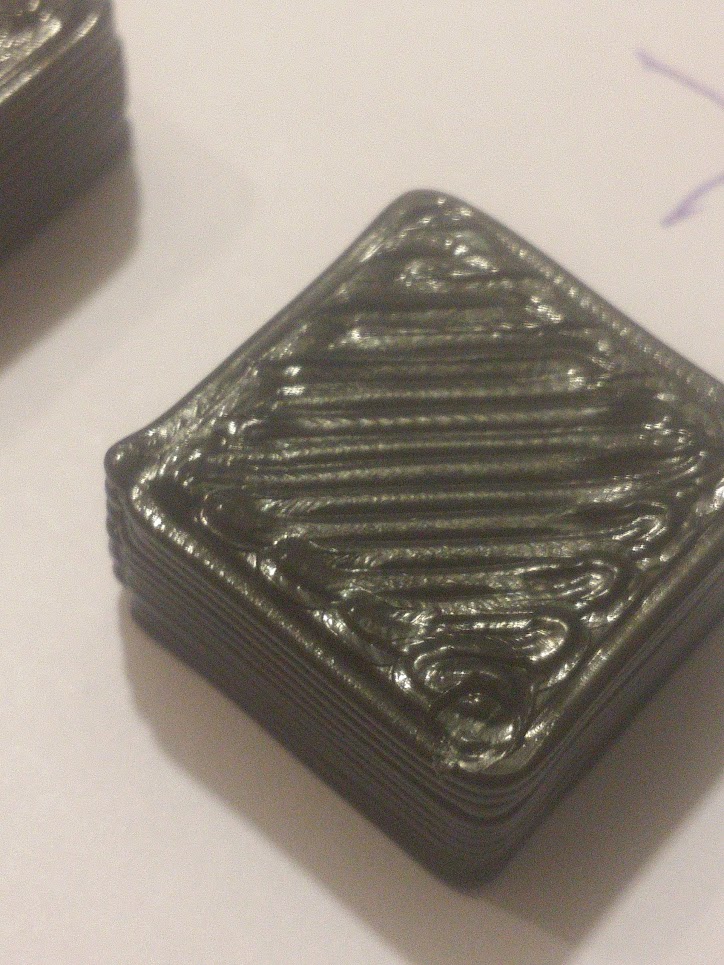
Image


Would love to hear peoples recommendations on what todo to fix this,
JoeJ
Posts: 1435
Joined: Sun Feb 16, 2014 10:52 am

Re: Gap between infill and perimiter

It looks like your 2 outer perimeters aren't touching, which means you are under-extruding. I would increase your extrusion multiplier by 5-10% until those 2 outer perimeters touch and are bonded together.
User avatar
jimc
Posts: 1124
Joined: Wed Aug 28, 2013 11:02 pm
Location: mullica, nj
Contact: Website

Re: Gap between infill and perimiter

X2

Also your extrusion width setting should be larger than your nozzle dia. Otherwide to will tend to get more round extrusions than flattened out ones. This is the reason for the auto setting. It automatically sets the width to 120% that of your nozzle dia.
Jory
Posts: 6
Joined: Fri Aug 14, 2015 10:52 am

Re: Gap between infill and perimiter

It also seems like your part would have weak layer-to-layer adhesion since your layers are so thick compared to what your nozzle diameter is. The max layer height I would ever print is 60% of the nozzle diameter for quick and dirty prints, which in your case would be 0.72mm. This might also help flatten out your perimeters too. It looks like you have some nozzle dragging going on with your infill too....
singhm29
Posts: 41
Joined: Thu Feb 12, 2015 11:52 pm

Re: Gap between infill and perimiter

jimc wrote:X2

Also your extrusion width setting should be larger than your nozzle dia. Otherwide to will tend to get more round extrusions than flattened out ones. This is the reason for the auto setting. It automatically sets the width to 120% that of your nozzle dia.

Good point on the extrusion width I changed that, what would you say a good range is for setting that above your nozzle size? 120%-200?
I did some fiddling around with the extrusion multiplier and was able to get 3 of the sides to merge but one side (I think the one that occurs right after a retraction) continues to have a slight gap...im thinking my retract settings might be off but ill do a few more tests before I post back with more questions!
singhm29
Posts: 41
Joined: Thu Feb 12, 2015 11:52 pm

Re: Gap between infill and perimiter

Jory wrote:It also seems like your part would have weak layer-to-layer adhesion since your layers are so thick compared to what your nozzle diameter is. The max layer height I would ever print is 60% of the nozzle diameter for quick and dirty prints, which in your case would be 0.72mm. This might also help flatten out your perimeters too. It looks like you have some nozzle dragging going on with your infill too....

I printed out a vase with .9 layer heights and it was very tough to shear apart. I based .9 on reading that people were able to achieve it and that people have been stating that its 80% of your nozzle size that is the max layer height achievable. Id like to hear what you think for sticking with 60%.

As for nozzle dragging, I'm a bit confused as I would think if you have nozzle drag it should occur on all levels not just the top...but bottom layers print fine its the top that seems to get dragged through any ideas why that might be?
User avatar
jimc
Posts: 1124
Joined: Wed Aug 28, 2013 11:02 pm
Location: mullica, nj
Contact: Website

Re: Gap between infill and perimiter

I dont think .9 height is too much but i definatley would not go higher. That would be max. As for width, 200% is probably a bit much. It really depends o the nozzle design and the size of the flat surface at the tip. Some nozzles come to a sharp point and some have a larger flat area. I use and e3dv6 without the volcano and i know their nozzles vary the flat depending on dia. I would limit the width to 110-150% max.
singhm29
Posts: 41
Joined: Thu Feb 12, 2015 11:52 pm

Re: Gap between infill and perimiter

I think I may use up an entire spool printing calibration cubes.
So the best ive been able to get is this
Image
using these settings
Extruder
1.2mm nozzle
1.00 extrusion multipler (upto 1.05 didnt shoe a difference)
1.2 extrusion width (when set to auto the gaps were worse and the top infill lines were spread more apart
Retraction
distance 1mm
no coasting
no wipe
retraction speed 1800

Layer
2 perimeters
3 top and bottom
.6 Layer height (.9 and .6 both showed the same issue of having gap between infill and perimeter)
90 First layer height
100 First layer width
50 First layer speed
*the very first layer comes out perfect in terms of touching the perimeter

Infill
Interior and External Infill rectilinear
20% infill
50% outline overlap !!This seemed to help the most with closing gaps but it seems the more i increase it the more over extrusion is left on the top layer
100% infill extrusion width
Minimum infill length 5mm

Temperature
200 (I was printing at 210 but had my nozzle dragging through hot filament alot it seems)

Cooling
Adjust printing speed for layers below 15 sec
Allow speed reductions down to 20%

Speed
3600 default
90% outline
80 solid
80 support
x/y 4800


Advanced
Only retract when crossing open spaces
Force retraction between layers
Only wipe for outer most
Thin wall behaviour
allow gap fill when necessary
10% Allowed periemter overlap (should this mathc my 50% infill overlap value?)

WHat is the protocol for listing parameters? Is it better to just attach the gcode file?
Which brings me to another thought...am I using the wrong thing to try an calibrate this? Im using a 20mm cube to calibrate .6 layer heights
On the bright side I am learning what bad settings look like lol.
One thing im gonna try to address is the possibility of backlash...im going to retension the axis belts and was thinking of maybe reducing jerk and accelerations in firmware...any thoughts would be much appreciated.
Last edited by singhm29 on Mon Sep 14, 2015 9:46 am, edited 2 times in total.
JoeJ
Posts: 1435
Joined: Sun Feb 16, 2014 10:52 am

Re: Gap between infill and perimiter

Your picture doesn't show up for me..
singhm29
Posts: 41
Joined: Thu Feb 12, 2015 11:52 pm

Re: Gap between infill and perimiter

The previous photo should be fixed but since then ive been working with a different PLA.

I finally think I understand how to get rid of the gaps and excess plastic build up that was causing ridges to form on lower layers while leaving gaps on top layers but in the process this has started happening which is really odd.

The corners on this calibration cube are coming out really weird.

Image

Image
Image
Rundown of settings (is there an efficient way to post settings?)
Extruder
1.2mm nozzle
.9 extrusion multipler
1.2 extrusion width
Retraction
distance 1.5mm
extra restart -.05
coasting .08
retraction speed 3000

Layer
2 perimeters
3 top and bottom
.6 Layer height
100 First layer height
100 First layer width
75 First layer speed

Infill
Interior and External Infill rectilinear
17% infill
50% outline overlap
100% infill extrusion width
Minimum infill length 5mm

Temperature
210

Cooling
Adjust printing speed for layers below 8 sec
Allow speed reductions down to 30%
Fan off layer 1 on for all other layers at 100

Speed
1800 default
80% outline
90 solid
90 support
x/y 9000
z 275

Advanced
Force retraction between layers
Minimum travel 3mm
Perform retraction during wipe
Only wipe for outer most
Thin wall behaviour
allow gap fill when necessary
15% Allowed periemter overlap
Last edited by singhm29 on Mon Sep 14, 2015 9:47 am, edited 1 time in total.

Return to “Troubleshooting and Bug Reports”