I'm getting really nice prints with PETG filaments with the fan turned off, but TERRIBLE Bridging!
I have tried the fan set to 60% and this gives me slightly worse prints with much better Bridging.
And also fan set to off, but to "Bridge Fan Override" set to 100% in Simplify3D.....but this has the same effect as no fan, and the fan doesn't seem to commit to being on with this setting while printing bridging, just a short feeble pulse?
I'm assuming this is down to the "Unsupported Area Threshold" setting being some limit to the size of the bridge before the fan kick in.
But, I'm a little confused to why the setting is not just in mm rather then sq mm?
How can I set it up to actually ramp up the fans for even short (10mm) bridges.
-
CompoundCarl
- Posts: 2005
- Joined: Wed Aug 05, 2015 7:23 am
Re: Unsupported Area Threshold and TERRIBLE Bridging.
Post your factory file and a picture of where you want the bridging to occur. Should be really easy to help you then.
And I have a feeling the bridging setting is in area (i.e. mm^2) because the actual length of each infill extrusion will change depending on the orientation. So the area is the only constant value you can use for the setting.
And I have a feeling the bridging setting is in area (i.e. mm^2) because the actual length of each infill extrusion will change depending on the orientation. So the area is the only constant value you can use for the setting.
Re: Unsupported Area Threshold and TERRIBLE Bridging.
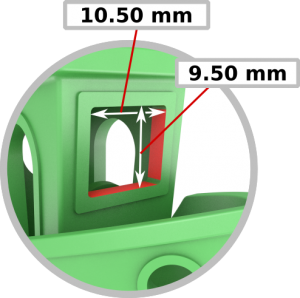
FFF attached, and here is where I'm having the bridging issue on the 3DBenchy torture-test. (attached the SLT too.)
-
bray.christopher
- Posts: 62
- Joined: Fri Jun 19, 2015 11:24 pm
Re: Unsupported Area Threshold and TERRIBLE Bridging.
This may or may not help.
On the OTHER tab, in the Bridging box, there is a setting called Extra Inflation Distance. This defines how much of the bridge is on "land". I discovered this while printing an XT part and notice some bridging completely missing and dibbling into the air. I never had this problem with PLA.
By default it is set to 0mm.
I have set all of my profiles to use 1mm. The more the merrier probably.
Sorry. I don't know how to resize the images.....

0mm

1mm

2mm

On the OTHER tab, in the Bridging box, there is a setting called Extra Inflation Distance. This defines how much of the bridge is on "land". I discovered this while printing an XT part and notice some bridging completely missing and dibbling into the air. I never had this problem with PLA.
By default it is set to 0mm.
I have set all of my profiles to use 1mm. The more the merrier probably.
Sorry. I don't know how to resize the images.....
0mm
1mm
2mm
