Page 1 of 1

Marks where solid infill section meet on top layers

Posted: Wed Dec 09, 2015 5:13 pm
by Nandox7
Hi,

In overall the printing quality is quite good the only thing I've been trying to improve is the following.
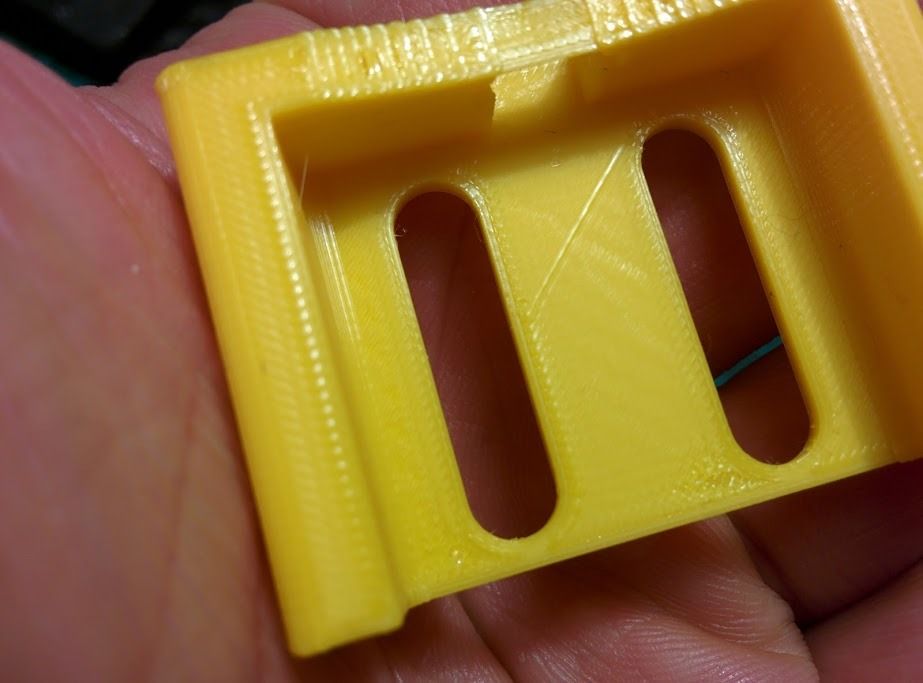
In the top layers where it has to do solid infill there are same marks where the filling gets together.
So half of it is done and the other half afterwards, in the part where the two infill sections meet.

Example:
Image

That diagonal mark wasn't made by the nozzle dragging it was made by the two infill sections meeting together.
I have tried to reduce infill overlap (despite I think it refers to the outlines) but didn't improved.
Reducing extrusion ratio isn't much of a choice because if I do tht there will start to have gaps where the infill meets the
outlines.

So my question is, is there any param that can be used to try and improve this?

Thanks.
Re: Marks where solid infill section meet on top layers

Posted: Thu Dec 10, 2015 1:09 am
by KeyboardWarrior
Nandox7 wrote:Hi,

In overall the printing quality is quite good the only thing I've been trying to improve is the following.
In the top layers where it has to do solid infill there are same marks where the filling gets together.
So half of it is done and the other half afterwards, in the part where the two infill sections meet.

Example:
Image

That diagonal mark wasn't made by the nozzle dragging it was made by the two infill sections meeting together.
I have tried to reduce infill overlap (despite I think it refers to the outlines) but didn't improved.
Reducing extrusion ratio isn't much of a choice because if I do tht there will start to have gaps where the infill meets the
outlines.

So my question is, is there any param that can be used to try and improve this?

Thanks.
The setting I believe you're looking for (The picture doesn't show up), is Outline Overlap. For more information, I suggest this post, viewtopic.php?t=1953.

It's under the Infill tab, raising the percentage a bit higher, will increase the coverage area of infill you get and help prevent any gaps.

->KeyboardWarrior out

Re: Marks where solid infill section meet on top layers

Posted: Thu Dec 10, 2015 6:50 am
by Nandox7
Ah sorry, hope this one works.

Image

The issue is not gaps, is just where the infill sections meet.
Hope the picture shows it well.

Re: Marks where solid infill section meet on top layers

Posted: Thu Dec 10, 2015 10:45 am
by Fred B
Judging by your picture it looks like this is caused by the accuracy of the machine. To be specific, the fill directions are opposing each other and this causes the machine backlash to be added between the two final segments.

Our machines aren't perfect so there are problems with regards to slop in the mechanics. Small problems but they do effect finish quality.

So, what things can you try here?

1) Rotate the part to match the final infill angle. (rotate 45 degrees in this case). This will isolate the backlash to one axis.
2) Rotate the part above another 90 degrees to run the fill on the other axis. This will show if the backlash is more of an issue on the X or Y axis. (You want the fill square to the part)
3) It's a real pain but if you want to have a good top layer try a concentric fill. You'll have to make extra processes to do this. To get a concentric fill on that layer change the perimeters to 999 for that layer. This will eliminate the infill operation for the top and place a nice concentric pattern in it's place. This would be a last resort for me.

Hope this helps.

Re: Marks where solid infill section meet on top layers

Posted: Fri Dec 11, 2015 6:31 am
by CompoundCarl
I would try adjusting the outline overlap

Re: Marks where solid infill section meet on top layers

Posted: Fri Dec 11, 2015 5:45 pm
by Nandox7
Thanks all for the tips.

I'll give them a try and see how it goes.