Page 1 of 1
Gaps in concentric infill
Posted: Mon Jan 18, 2016 4:31 am
by realthunder
I am trying to use concentric solid infill, and found that there is unnecessary gaps. See the following picture.

- gap.png (3.92 KiB) Viewed 4900 times
I am printing a vertical slop here. The gap is filled in the next layer.

- gap2.png (4.48 KiB) Viewed 4900 times
I've set the infill overlap to 50% but no help here. I think it is because the software insists on infill with a loop here, but a single line infill would be perfectly fine. Am I missing something?
Re: Gaps in concentric infill
Posted: Mon Jan 18, 2016 7:04 am
by CompoundCarl
We could probably help a lot more if you attached your factory file (File > Save Factory File)
Re: Gaps in concentric infill
Posted: Mon Jan 18, 2016 8:09 pm
by realthunder
This is my factory file. The screenshot in my previous post refers to layer 97 and 98.
Re: Gaps in concentric infill
Posted: Tue Jan 19, 2016 8:41 am
by billyd
I avoid concentric infill because it does a poor job in general. They need to fix this.
Re: Gaps in concentric infill
Posted: Sat Jun 03, 2017 8:49 pm
by hansksd
I just encountered this too in the latest version (3.1.1), so it's still not fixed. The problem does indeed occur where a single line needs to be laid instead of a loop.
Re: Gaps in concentric infill
Posted: Sun Aug 06, 2017 6:33 pm
by singular
This is still an issue in 4.0:
Concentric:
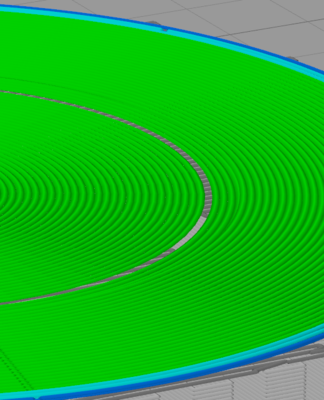
- Concentric Infill
Rectilinear:

- Rectlinear Infill