Page 1 of 1
Making a part SOLID
Posted: Thu Mar 24, 2016 7:16 pm
by DForbes
OK, probably been discussed before but everything I am reading is not getting me closer to an answer. How do you print an object SOLID, no infill and I mean 0 infill? What settings do need to make this work?
Thanks,
Dennis
Re: Making a part SOLID
Posted: Fri Mar 25, 2016 7:50 am
by CompoundCarl
Just set the infill to 100%. If that isn't working for you, post your factory file (File > Save Factory File) and also include a screenshot pointing out where you think the infill is being added. That will make it easier to help out.
Re: Making a part SOLID
Posted: Tue Mar 29, 2016 1:46 pm
by zemlin
I've found setting the bottom layers to 9999 works well. I prefer that over 100% infill because even at 100% there will be a discontinuity at transitions between features that protrude from a surface.
Re: Making a part SOLID
Posted: Tue Mar 29, 2016 10:45 pm
by nerys
as a novice at this tech can someone clarify as to the difference between 100% infill and "solid" ?
Re: Making a part SOLID
Posted: Wed Mar 30, 2016 5:39 am
by CompoundCarl
As far as S3D is concerned, I would say they are the same thing.
Re: Making a part SOLID
Posted: Wed Mar 30, 2016 7:51 pm
by Tetraodon
100% Infill
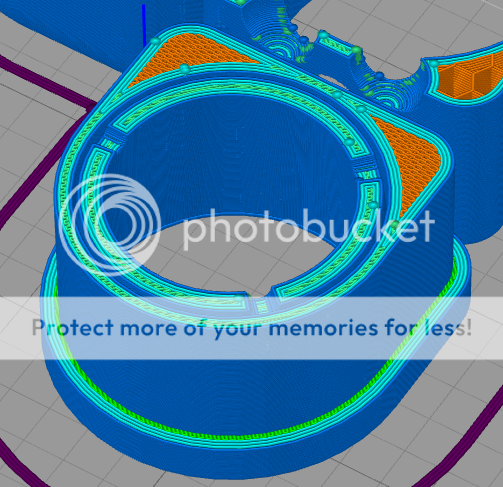
Bottom Layers - 9999

Outline/Shells - 100

Edit: Note that Rectilinear infill looks similar/same as the "Bottom Layers - 9999" on 100%.
Re: Making a part SOLID
Posted: Thu Mar 31, 2016 5:22 am
by CompoundCarl
The difference is that you are using honeycomb internal infill pattern vs rectilinear solid layer infill. If you make the internal pattern rectilinear then they would be the same.
But yes, otherwise, there is a difference since you have selected different patterns.
Re: Making a part SOLID
Posted: Thu Mar 31, 2016 10:03 am
by zemlin
And concentric infill with 9999 layers is (about) the same as lotsa outlines.
I don't have my S3D computer handy, but if you go through the same exercise on a part that has a protrusion on the top surface, you'll see what I said about the discontinuities you'll get with 100% infill near the transition vs 100% layers or outlines.
In my experience even with 100% rectilinear infill, layers still resulted in a higher-density model. I did not look at filament usage on those different setups - that that might be a more conclusive way to get a comparison.
Re: Making a part SOLID
Posted: Fri Apr 01, 2016 7:29 am
by DForbes
Thanks for all of the replies! I tried the 9999 for bottom layer and it worked great. The mistake I was making was not really understanding how infill worked. I though if you had 100% infill than that meant "solid layer" but after paying more attention to the colors I realized I really wanted 100% solid layer.
Thanks again!
Dennis