Page 1 of 2
Confused & bewildered
Posted: Fri Aug 19, 2016 4:41 am
by Mike_Francies
Hi, I have been trying to create an object that consists of two cylinders, created from surfaces, one inside the other with the internal one being taller than the outside one. S3D imports the model just fine but when the print is previewed, the inner cylinder is stepped at the level of the outer cylinder's top. No matter what I try I cannot get S3D to correctly slice the two cylinders.
Can anyone help?

- SolidWorks Model

- S3D Import
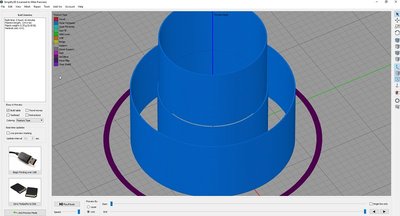
- S3D Sliced
Re: Confused & bewildered
Posted: Fri Aug 19, 2016 5:09 am
by mroek
Your screenshot shows that you have multiple processes. How are those set up? Do you need multiple processes? Could you try with just a single process?
If you post a factory file ("Save Factory File" in S3D), then I'm sure you'd get a better answer.
Re: Confused & bewildered
Posted: Fri Aug 19, 2016 5:24 am
by Mike_Francies
There is only one process used. The three were there to try and get round the problem with different processes at the level where the outer cylinder finished. The latest uses only one process and the factory file is attached as well as the STL file so others can play. Thanks.
Re: Confused & bewildered
Posted: Fri Aug 19, 2016 6:15 am
by mroek
Your model has errors (just try "Identify Non-Manifold Edges" under the Repair menu, and you'll see) . And also, the walls of the cylinders seems awfully thin, are they just surfaces instead of solids?
In short, your model is flawed, and you need to fix that.

Re: Confused & bewildered
Posted: Fri Aug 19, 2016 7:50 am
by Mike_Francies
Hi mroek, I have made many, many models using surfaces only, all without problems until this one. Surfaces are great if you only want a single outline, the problem with a solid is that S3D will insist on doing two passes around even the thinnest of walls and it is weight that is so important in what I am doing. Take a look at the attached model, all done with surfaces. So, I don't think my model is flawed. If you consider each cylinder as separate items, they print just fine but when one is placed inside the other, with the taller one in the middle, S3D puts in a step that is not there.
Also, take a look at this site.
https://3dlabprint.com/index.php?id_pro ... er=product Their whole range of models are done with surfaces and they use S3D. I printed one of their Spitfires and it was this that made me realise that surfaces, rather than solids, was the way to go for weight reduction.
Re: Confused & bewildered
Posted: Fri Aug 19, 2016 8:19 am
by dorsai3d
It's just short of miraculous that that works at all. Solid parts should be solid models. That you can get surfaces to print at all is a bonus, likely because everyone's used to having to try to fix people's junk models automatically (not that STL is a good filetype anyways, but y'know, legacy....).
Anyways, the problem you're having with the cylinders is likely because it's seeing the bottom half of the internal cylinder as a hole in the part, so the wall needs to be offset to a larger diameter, and the top half as the outside of the part, (i.e. a protruding cylinder) so it needs to be offset inwards.
Re: Confused & bewildered
Posted: Fri Aug 19, 2016 8:33 am
by Heutinck
base on what dorsai3d said, can you just move the inner cylinder to a location beside the other one so it doesn't see it as a hole in the first cylinder.
Re: Confused & bewildered
Posted: Fri Aug 19, 2016 9:29 am
by Mike_Francies
This is just a simplified version as a test piece. On the actual part the central piece is attached to the outer but in order to print it as a single layer, the offset is set to the thickness of the extrusion.
If you have the opportunity to study the Spitfire files, you will notice that all the internal structure is made up from surfaces that do not quite touch the outer surface. When the part is made, because of the thickness of the extrusion, the parts are attached to one another. It is a very neat way of connecting very thin layers and making very light but rigid structures.
It would appear that I have found one of the limits of S3D but I cannot think of why S3D should treat the inner cylinder any differently just because it is inside another. It does not matter how much you offset the inner cylinder, it always results in a step when sliced. I'll have to try another slicer

Re: Confused & bewildered
Posted: Fri Aug 19, 2016 11:05 am
by dorsai3d
Mike_Francies wrote:It would appear that I have found one of the limits of S3D but I cannot think of why S3D should treat the inner cylinder any differently just because it is inside another. It does not matter how much you offset the inner cylinder, it always results in a step when sliced. I'll have to try another slicer
Read my description where I outline exactly why this happens. Slicers are looking for a solid model because, well, parts are solid. You can make thin walled stuff, but using just surfaces will always be asking for trouble.
For this specific case, you could separate the parts into their constituent meshes (Separate Connected Surfaces) and it might work right off the bat. Just because the spitfire guy was able to make the ugly hack work doesn't change the fact that it's an ugly hack.
Re: Confused & bewildered
Posted: Sat Aug 20, 2016 6:51 am
by Mike_Francies
Hi dorsai3d,
I am surprised that you think this is 'an ugly hack'. As I understand it, the slicer accepts stl files and these can represent surface models. After all, stl files only represent the surfaces of any solid model. What is the problem with trying to push the limits of what we can achieve? Isn't this how progress is made? The fact that S3D, at this moment in time, cannot cope with this particular scenario doesn't mean it cannot be done. It is quite happy representing the model before the slicing engine takes over which is why I am assuming it is a slicing issue and not a model issue.
I am sure I am not the only person using surfaces to produce 3D printed parts as this appears to be the only way single extrusion walls can be produced. The problem is that no matter how thin you make the solid model, there will always be an inner and outer layer laid down. The spiral option cannot work as there are multiple parts within the same model.
I will continue my quest and thanks for the comment so far.