Page 1 of 2

failed to parse xml on startup -> printing previous model

Posted: Thu Apr 20, 2017 7:18 am
by marat
Hello,

I'm using simplify3d for couple of weeks now and today i got this error popup on startup:
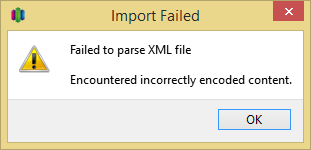
Image
According to another topic here, german letter ß in the file name could be the reason fot his error.

After removing my previous model and printing another one, I actually noticed my printer still prints the previous model while simplify3d thinks it would print the new one:
print.png
I also had an error like "printer does not support x3g" couple of days ago, but it still printed the right model.
Is it advisable to restart simplify3d after errors?

kind regards,
Marat

Re: failed to parse xml on startup -> printing previous mode

Posted: Thu Apr 20, 2017 8:18 am
by MasterFX
That is a problem with the umlauts in the file name.
S3D saves the last opened state as factory file. You can try to delete savedState.factory located in %USERPROFILE%\AppData\Local\Simplify3D\S3D-Software and then restart S3D

Re: failed to parse xml on startup -> printing previous mode

Posted: Fri Apr 21, 2017 7:25 am
by marat
seems like simplify3D stuck forever on this particular last model.
I have deleted savedState.factory and other files in this directory, restarted my printer and pc, loaded different models, but it prints always the same old model.

reinstalling simplify3D fixed this issue.

Re: failed to parse xml on startup -> printing previous mode

Posted: Sun Aug 27, 2017 9:42 am
by marat
4 months later, this problem still exists on 4.0
Software is stuck.
Deleting factory file messed up my profiles: filament, toolhead and print quality selection dropdowns disappeared from process settings.
I still can't start a print because S3D tries to send gcode instead of x3g to my printer, no matter what i'm configuring.
Had to remove my profiles and use configuration assistant to load new one.
The result is: i lost all my hard-earned settings improvements and customized scripts.

Shouldn't the feature-leading premium printing software be able to handle couple of special characters?
Its almost 2018 and utf-8 isn't black magic where you need to sacrifice 40 virgins and bathe in their blood to summon a ghost of dead developer, who will add utf-8 support to S3D :x

Re: failed to parse xml on startup -> printing previous mode

Posted: Sun Aug 27, 2017 12:56 pm
by blackbird2016
marat wrote: Had to remove my profiles and use configuration assistant to load new one.
The result is: i lost all my hard-earned settings improvements and customized scripts.
That really is "bad luck"!
Until the problem is solved I would advise after you made all your settings again
to export your profiles and firmware settings.
After an update or crash they could be imported again.

Re: failed to parse xml on startup -> printing previous model

Posted: Thu Jun 28, 2018 1:05 am
by Karisu
Hi,

I was having the same problem and found the source for the error;
I had edited the Ending Script and had added ä letter in one comment.
Once removed, the error also stopped appearing.

Thanks for the help, forum :D

Re: failed to parse xml on startup -> printing previous model

Posted: Thu Mar 28, 2019 11:30 am
by ohmstede
This issue for me was also because of my ending script. I had a degree symbol (°) in one of my note texts after a command. After removing it the error disappeared.

Re: failed to parse xml on startup -> printing previous model

Posted: Sat Feb 22, 2020 11:07 am
by VidarM
Simplify3D does not rekognice utf-8 caracters internely in XML files. (FFF profile files are XML files)

Therfore: All special caracters like language spesific caracters must be avoided.
That include in Process and Profile names and G code script commets in FFF Settings. ( G90 ; Dont coment with æøå here :( )

I live in Norway and discovered this when I was using norwegian caracters like æøå in FFF Settings.


-----
Tip to Simplify3D developer to maybe get on the right track on solving this problem:

Your FFF xml fils should include utf-8 encoding
like this:

<?xml version="1.0" encoding="utf-8"?>
<profile name="Filament-change- CP-01 middle (modified)" version="2020-02-22 10:59:32" app="S3D-Software 4.1.2">
<processName>Process1-7-tak-grå</processName>
<groupName></groupName>
<applyToModels>3DBenchy</applyToModels>
<baseProfile>Creality Ender 5 (modified)</baseProfile>
...

not this as it is today:
<?xml version="1.0"?>
<profile name="Filament-change- CP-01 middle (modified)" version="2020-02-22 10:59:32" app="S3D-Software 4.1.2">
<processName>Process1-7-tak-grå</processName> <!-- here is the problem: å -->
<groupName></groupName>
<applyToModels>3DBenchy</applyToModels>
<baseProfile>Creality Ender 5 (modified)</baseProfile>
...
The last XML example does not parce. And is not well formed XML

But of corse. I'm nut shure if utf-8 is compatible with the FFF standard. ( Iknow XML but not FFF)

Regards
Vidar

Sad that this really easy to solve bug still existsl

Posted: Fri Apr 10, 2020 12:32 pm
by WaldMaker
I just lost my saved state due to this really simple to solve bug!!!! Why does it still persist?

To make matters worse the program deletes the whole savedState folder so you don't even have a chance to edit the saved FFF files.

Very very nasty and creates a bad aftertaste. I develop software myself and own a LLC since 26 years specialized on CRM software, which is installed and in use in many different countries and languages. Please just read what Microsoft has published on localization and serialization. It's so easy.

Re: failed to parse xml on startup -> printing previous model

Posted: Fri May 08, 2020 9:25 am
by Riffer
I must confirm and this bug is really annoying.

Created a heat tower and named the processes with "195°", "200°" and so on with ° for degree celsius in Germany.

Trying to reload the file (or restarting S3D: xml invalid. What a shame.