Page 1 of 1
Brim + Support in 4.0
Posted: Fri Jul 28, 2017 9:30 am
by jmunkki
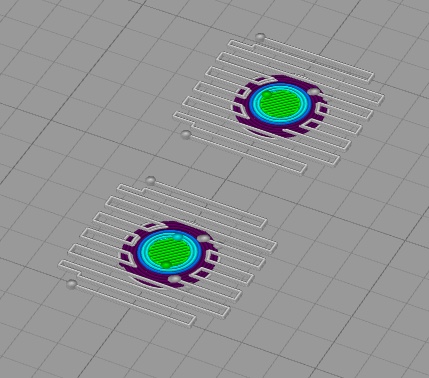
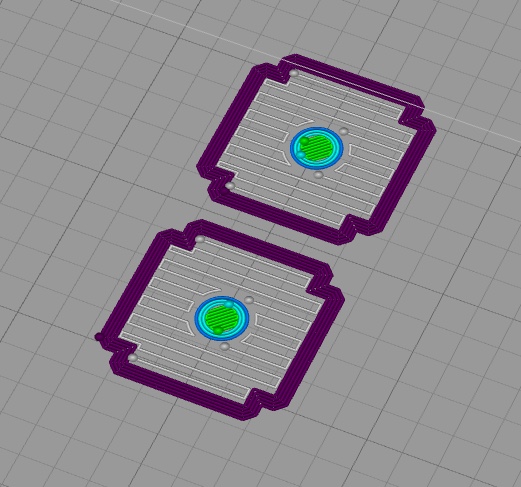
I wanted to use a brim to make sure a tall & thin part would stick to the bed, but I also need support. 4.0 doesn't seem to give me the option to put a proper brim on the part and instead puts them on the support, which is pointless. Screenshots comparing the same model & settings on 3.1 and 4.0 attached.
Re: Brim + Support in 4.0
Posted: Fri Jul 28, 2017 5:11 pm
by horst.w
You are right,
using support displace brim / skirt to the outer-site area.
But when using support you don't need brim to enforce sticking the smal object to the print-bed. So to demonstrate with a sphere. Using raft may help
Normally I use brim with a distance of 0.05 mm.
H.
Re: Brim + Support in 4.0
Posted: Fri Jul 28, 2017 5:57 pm
by brian442
You can also try setting the "Support Base Layers" to 1, as that will create a solid layer at the bottom of your supports which essentially acts the same as the brim
Re: Brim + Support in 4.0
Posted: Sat Jul 29, 2017 2:34 am
by horst.w
Good idea!!!
H.
Re: Brim + Support in 4.0
Posted: Sat Jul 29, 2017 6:51 am
by jmunkki
Assuming someone wants the new behavior, I just hope they can add a checkbox to control this behavior.
Dense support layers will also print on top of part surfaces, if you have supports that rise up from a part. This would make it much hard to remove the supports cleanly.
The screenshots I posted were from a real model that printed reasonably well at 0.2mm layer height, but looked a lot better if the top was printed at 0.1mm layer height. Unfortunately 0.1mm put too much pressure on the part and would detach from the build plate without the larger base layer.