Page 1 of 1
Z-lift for moves passing over objects
Posted: Wed Oct 04, 2017 3:10 pm
by FlyingDutch
On the advanced tab there's a setting 'avoid crossing outline for travel movements. This also has a detour factor. In itself this works, however, if the detourfactor is reached, it'll plot a direct route. One can't completely make travel movements voids objects on the plate.
However, in some cases, this is exactly what one wants. For instance, when printing the 3dlabprint airplanes, these are single-walled prints which are slightly overextruded. The result is that during these prints, it happens that the nozzle slightly hits a wall during a travel movement.
It would be nice to have an extra setting 'z-hop for travel movements'. This could be added on the advanced page. I'd make it so that you can set 'avoid crossing outline', then the detourfactor and then a checkbox 'use z-hop if avoiding is not possible'.
Re: Z-lift for moves passing over objects
Posted: Thu Oct 05, 2017 4:03 am
by brian442
I think you can already do this. Just go to the Advanced tab and tell it to only retract when crossing open spaces. Then go to the Extruders tab and add retraction vertical lift. Then as long as you have "avoid crossing outlines" enabled, it will try to stay within the object, but if it can't, it will retract, lift, and then move directly to the new location.
Re: Z-lift for moves passing over objects
Posted: Thu Oct 05, 2017 9:29 am
by FlyingDutch
This is not exactly the same. This means that it'll do a z-hop on every retract. I don't want that. I just want it to do a z-hop when it's not possible to avoid an object on travel moves..
Re: Z-lift for moves passing over objects
Posted: Fri Oct 06, 2017 5:13 am
by brian442
But when you enable the option "only retract when crossing open spaces", it means that it only retracts when crossing over and object, and thus only lifts when crossing over an object. So that's one way to do what you asked for.
Re: Z-lift for moves passing over objects
Posted: Fri Oct 06, 2017 3:17 pm
by FlyingDutch
No, since then it won't retract for non-open space travel moves. I just want it to rectract normally, without z-hop, but if it can't plot a route around an existing object within the given detour-factor, that it THEN does a z-hop.
Really, it's something completely different. I don't want it to z-hop on retracts, nor do I want it not to retract when not crossing open spaces.
Re: Z-lift for moves passing over objects
Posted: Sat Jun 27, 2020 5:32 am
by cetrespeo
Same problem here. Don't know why, but my nozzle is sometimes slightly hitting support structures when repositioning. The effect is that sometines the nozzle takes the support down.
Re: Z-lift for moves passing over objects
Posted: Tue Jun 30, 2020 5:22 am
by DECZH
I had exactly the same problem
Re: Z-lift for moves passing over objects
Posted: Thu Oct 21, 2021 3:08 pm
by exxosuk
Same here. It needs to Z-lift while not extruding. Traveling only.
Re: Z-lift for moves passing over objects
Posted: Thu Oct 21, 2021 3:18 pm
by exxosuk
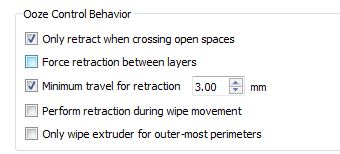
OK so this seems to work.
- 2.JPG (20.23 KiB) Viewed 10411 times
Retract and vertical lift only happens when moving more than 3mm from point to point.
The 3mm move may want increasing , depending on the size of your object,