gabrielebrugnoni
Posts: 12
Joined: Fri Feb 16, 2018 9:09 am

Dense support issue

Hello.
I've problem printing a small object with dense support.
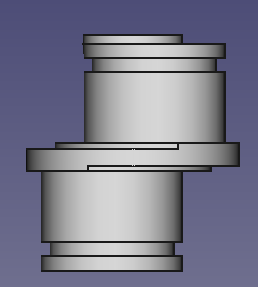
The object has on its base a little groove for a seeger ring, that doesn't need support.
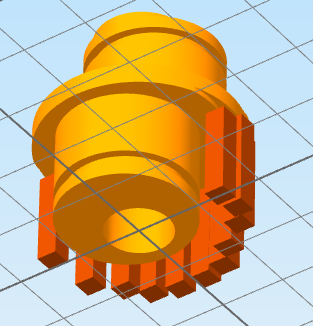
This is the front view of the object:
Image

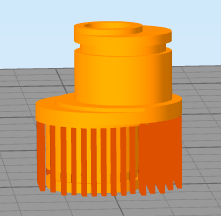
The support has been placed automaticcally from build platform only:
Image

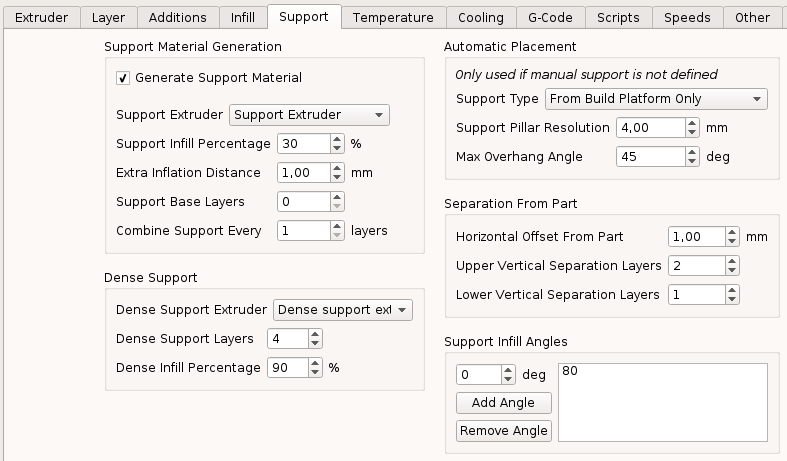
using the following settings:

Image

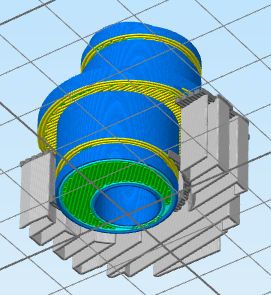
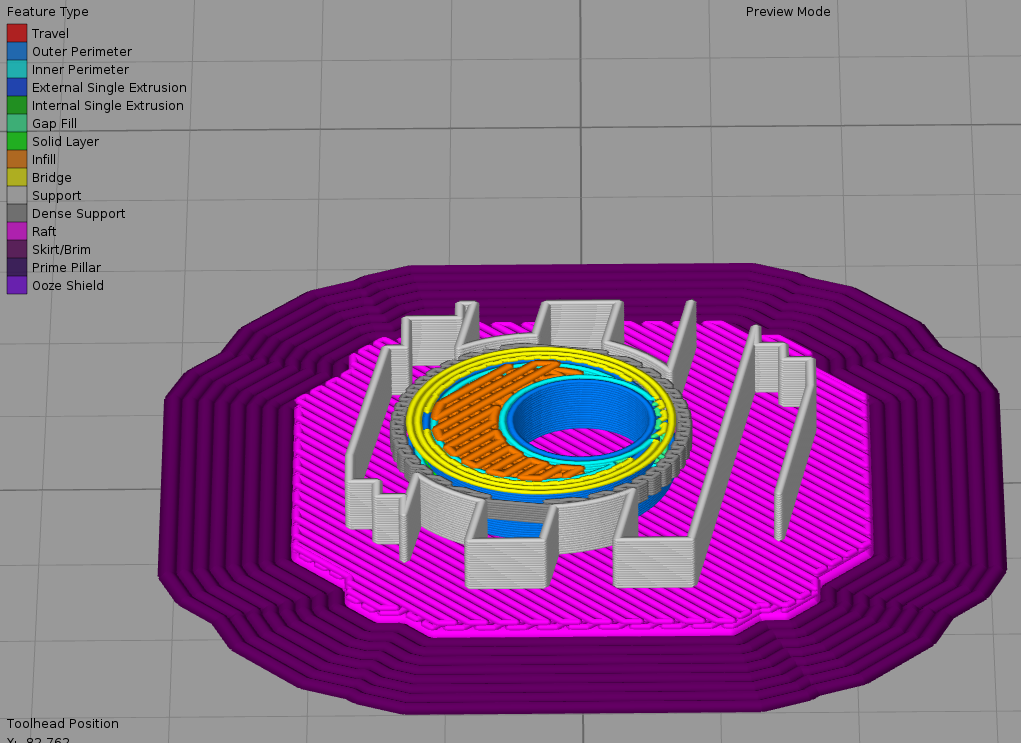
Simplify3d generates a dense support in air at the height of the seeger ring groove.
In the cross-section image below, the dense support is visible near the yellow bridge, between the support wall and the part:
Image

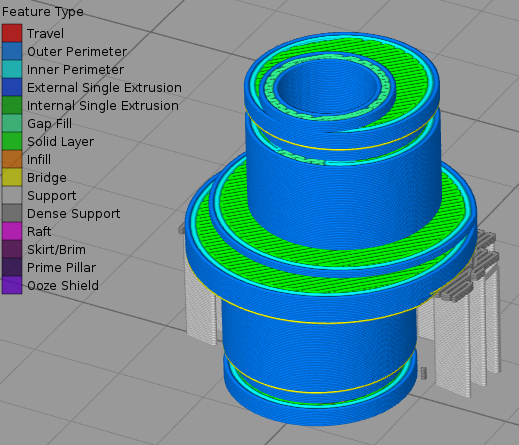
This is a Y cross-section view of the entire object, the bottom dense ring support is placed on the air, and will never be printed correctly:
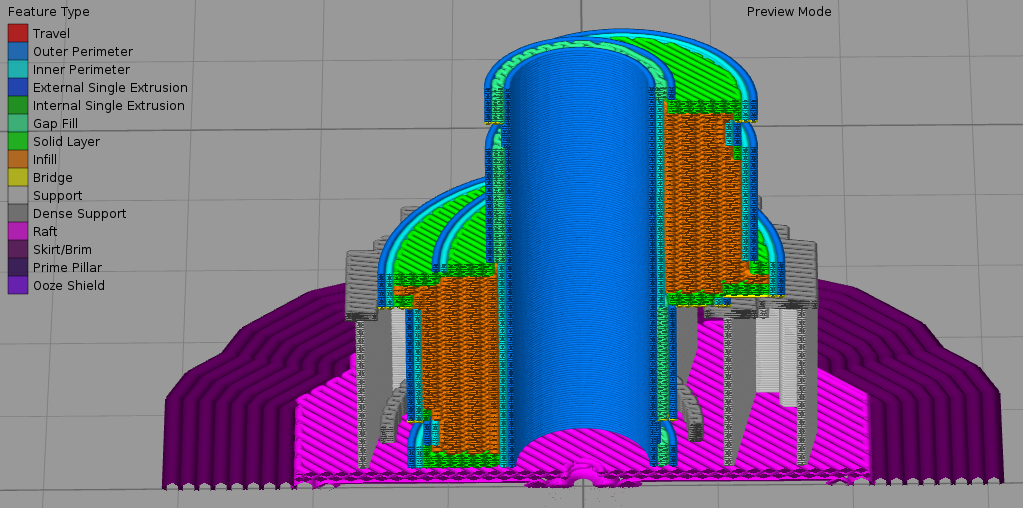
Image

I've played a lot with parameters, but the issue still be present.

Any suggestion ?

Thank you.
Regards,
Gabriele.
User avatar
dkightley
Posts: 2405
Joined: Tue Mar 10, 2015 4:09 pm

Re: Dense support issue

As there are areas where you do not want support...ie the groove.....I would not use the automatic placement of support and place support where you want it manually. What's happening is that the auto placement is trying to put support inside the groove....and your support settings are doing the rest....sparse main support with dense support on top, and the spacing options doing the rest!!

Set the support resolution to 2 or 3 and place a ring of support pillar around the extreme edge of the centre flange section and the shoulder on it.
Doug Kightley
Volunteer at the National Tramway Museum http://www.tramway.co.uk
Railway modeller and webmaster at http://www.talkingtgauge.net
gabrielebrugnoni
Posts: 12
Joined: Fri Feb 16, 2018 9:09 am

Re: Dense support issue

dkightley wrote:As there are areas where you do not want support...ie the groove.....I would not use the automatic placement of support and place support where you want it manually. What's happening is that the auto placement is trying to put support inside the groove....and your support settings are doing the rest....sparse main support with dense support on top, and the spacing options doing the rest!!

Set the support resolution to 2 or 3 and place a ring of support pillar around the extreme edge of the centre flange section and the shoulder on it.
Thanks for your reply.
I've already try manual support.

This is an example, i've manually put pillars on the larger side of the flange:

Image

and this is the generated support, the dense support ring is still generated on wrong place:

Image

Thanks.
User avatar
dkightley
Posts: 2405
Joined: Tue Mar 10, 2015 4:09 pm

Re: Dense support issue

Attach a factory file to a post.....and I'll try and sort out the support placement for you....
Doug Kightley
Volunteer at the National Tramway Museum http://www.tramway.co.uk
Railway modeller and webmaster at http://www.talkingtgauge.net
gabrielebrugnoni
Posts: 12
Joined: Fri Feb 16, 2018 9:09 am

Re: Dense support issue

dkightley wrote:Attach a factory file to a post.....and I'll try and sort out the support placement for you....
Here is the file...
Thanks!
Attachments
eccentric_05.factory.zip
Factory file
(209.4 KiB) Downloaded 98 times
wirlybird
Posts: 1374
Joined: Sun Jul 17, 2016 1:32 pm

Re: Dense support issue

Turn off extra inflation distance and see if it helps any.
gabrielebrugnoni
Posts: 12
Joined: Fri Feb 16, 2018 9:09 am

Re: Dense support issue

wirlybird wrote:Turn off extra inflation distance and see if it helps any.
Yes, it does, but not at all, that's why I suppose there could be a bug:

Image

My printer is a Cetus 3D.
I'm trying to get the same easy-to-remove support as the Cetus software does.
This is the reason why I've set an extra inflation.

I've done a lot of tests but S3D support is very difficult to remove when printing this object.

I don't know how cetus software generates its support, it seems that there are no layers of space between the dense support and the part, and the support doesn't melt with the part.

Thanks.
Gabriele.
User avatar
dkightley
Posts: 2405
Joined: Tue Mar 10, 2015 4:09 pm

Re: Dense support issue

Yes, it does, but not at all, that's why I suppose there could be a bug:
Why is it that every time someone can't get the results they want, then its a bug!??

I've modified the manual support and settings in your factory file to how I would set up for my printer to get easy-peel support!

Upgrade to the latest software release if you're not there already.....and try my settings to see if they help.
Attachments
eccentric_dhkmod.factory
(224.15 KiB) Downloaded 149 times
Doug Kightley
Volunteer at the National Tramway Museum http://www.tramway.co.uk
Railway modeller and webmaster at http://www.talkingtgauge.net
gabrielebrugnoni
Posts: 12
Joined: Fri Feb 16, 2018 9:09 am

Re: Dense support issue

dkightley wrote:Why is it that every time someone can't get the results they want, then its a bug!??
Dear Doug, you're absolutly right, but I'm a software and firmware developer since 1988, so...

Thanks for your suggestions, I'll try it today and let you know.

Ciao!
Gabriele.
gabrielebrugnoni
Posts: 12
Joined: Fri Feb 16, 2018 9:09 am

Re: Dense support issue

dkightley wrote:
I've modified the manual support and settings in your factory file to how I would set up for my printer to get easy-peel support!

Upgrade to the latest software release if you're not there already.....and try my settings to see if they help.
The sofware version I'm using is 4.0.1.

I've successfully printed your modified version, the support has been removed easealy.
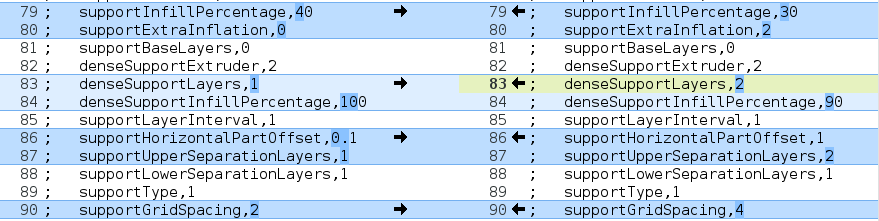
I notice this differences in settings (the left panel is your version):

Image

I suppose that you've resolved the issue by reducing the horizontal offset and by manually removing pillars near the object.
I also notice that there is difference in supportGridSpacing, but i don't know how to set this parameter.

If I use 1 separation layer when printing with 0.1mm layers height, I can't remove the structure because it is melt with the object.
So, why your modified version with 1 separation layer was so easy to peel ?


Thanks.
Ciao.
Gabriele.

Return to “Troubleshooting and Bug Reports”