Page 5 of 8

Re: Malyan M180 3D Desktop printer ?

Posted: Thu Jan 08, 2015 3:37 pm
by syl20
Thank you,
merci beaucoup!

Re: Malyan M180 3D Desktop printer ?

Posted: Thu Jan 08, 2015 8:23 pm
by guelhas
acefx wrote:Software Mod & and correction.

Compatible version of MakerBot with patch file from Ukrainian distributor
MakerBot-makerware 3.4.0.42 http://fano.kiev.ua/Malyan-M180/MakerBot-3.4.0.42.zip
MakerBot-makerware 3.4.1.48 http://fano.kiev.ua/Malyan-M180/MakerBot-3.4.1.48.zip
MakerBot-makerware 3.4.1.48R2 http://fano.kiev.ua/Malyan-M180/MakerBo ... .48-r2.zip
Download the version from makerBot & replace the files with patched ones


Latest firmware update : v 7.8 realeased
Changelog :
.Better handling of extruder temperature.
.Vref state speeded up to correct "First command after Vref default bug"
.Better driving of stepper motor ( less noisy )


PM if interested.


TODO :
- Establish a correct profile for the printer, with good value, since they differs from one to another depending the software profile i have.
- Use makerware as the main software and port the M180 profiles and value to new version of the software since we are stuck on 2.40 for now (eg.3.40)( or maybe on another software )
- Create a simplify3d compatibility !!! /!\
- create a heatbed calibration Gcode for all M180 owner could do the calibration easily.
- Your suggestions.
I recently bought a malyan w150. from what i read i'm assuming the m180 and w150 use the same board/drivers/firmware.
The problem i'm having in my w150 is that my makerware doesnt recognize the printer although i have installed the drivers on the sd card that came with the printer. Do i have to install a more recent firmware for it to be recognizable in this software?
In your post you talk about a 7.8 firmware and i don't know if it will solve this issue i'm having. I have also a wanhao duplicator 4x and both printers seem makerbot clones. Do they have the same board? Can i use the same sailfish firmware installed on my wanhao in the malyan w150?

Awaiting answer and thanks in advance

Rui Silva

Re: Malyan W150 3D Desktop printer ?

Posted: Fri Jan 09, 2015 4:40 am
by bertinhu
acefx wrote:Software Mod & and correction.

Compatible version of MakerBot with patch file from Ukrainian distributor
MakerBot-makerware 3.4.0.42 http://fano.kiev.ua/Malyan-M180/MakerBot-3.4.0.42.zip
MakerBot-makerware 3.4.1.48 http://fano.kiev.ua/Malyan-M180/MakerBot-3.4.1.48.zip
MakerBot-makerware 3.4.1.48R2 http://fano.kiev.ua/Malyan-M180/MakerBo ... .48-r2.zip
Download the version from makerBot & replace the files with patched ones


Latest firmware update : v 7.8 realeased
Changelog :
.Better handling of extruder temperature.
.Vref state speeded up to correct "First command after Vref default bug"
.Better driving of stepper motor ( less noisy )


PM if interested.


TODO :
- Establish a correct profile for the printer, with good value, since they differs from one to another depending the software profile i have.
- Use makerware as the main software and port the M180 profiles and value to new version of the software since we are stuck on 2.40 for now (eg.3.40)( or maybe on another software )
- Create a simplify3d compatibility !!! /!\
- create a heatbed calibration Gcode for all M180 owner could do the calibration easily.
- Your suggestions.


hello ...
bought a printer Malyan W150 and liked to get the firmware of the machine ...
they tried to make a upgrad to 7.8 and could not ..
the display shows 3D Printer and I can not work with the display ...
like that helps me to solve this problem ..
I only work with version 3.4.1.124 makerware
thank you

Re: Malyan M180 3D Desktop printer ?

Posted: Fri Jan 09, 2015 1:11 pm
by acefx
Hi !
I don't have any experiences with the W150.
From the information i have from Malyan the W150 /Freesculpt EX1 is a First gen printer with different motherboard.
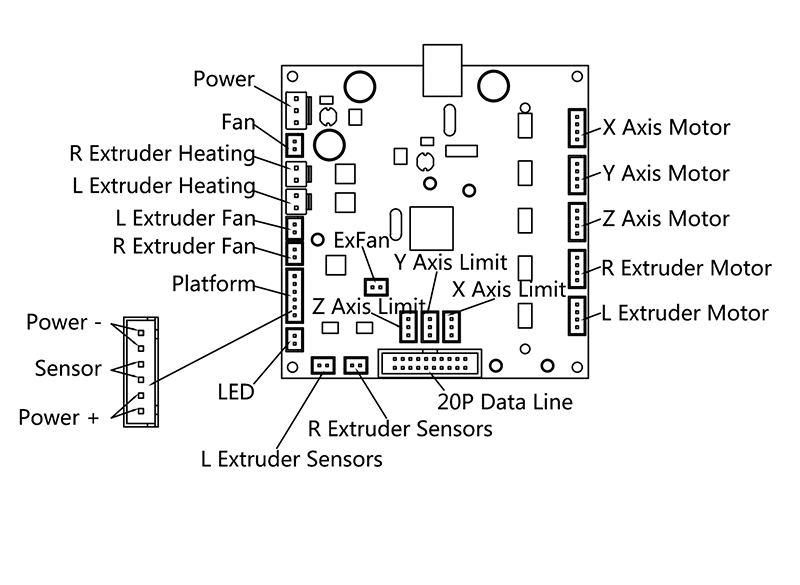
Image

Here is the First gen Motherboard diagram.

Both motherboard run on the sailfish firmware...
The second gen motherboard firmware is modified to be compatible with the new screen and the rotary encoder button and some hardware replacement.

Makerbot MAkerware in our version as been modified since they don't have the same USB to serial interface than the replicator series.
I sorry but since we don't have the printer here, it's maybe better to ask Simplify 3d to support the printer
or mail the malyan support ( yes they respond sometimes ) for firmware upgrade / compatibility.

Re: Malyan M180 3D Desktop printer ?

Posted: Sun Jan 11, 2015 3:05 pm
by bertinhu
He liked to get the firmware to the printer Malyan W150 ...
I have to stop because they do not have the printer firmware
someone help me

Re: Malyan M180 3D Desktop printer ?

Posted: Tue Jan 13, 2015 8:10 am
by acefx
i try to get you that

Re: Malyan M180 3D Desktop printer ?

Posted: Tue Jan 13, 2015 8:49 am
by bertinhu
Thank you
mail [email protected]

Re: Malyan M180 3D Desktop printer ?

Posted: Tue Jan 13, 2015 8:57 am
by acefx
Are you used to deal with avrDude flashing ?
I have the latest Github for malyan W150 here https://github.com/MalyanSystem/Malyan-W150-Sailfish

but you need to compile it , and flash it with avrdude.
you enter in bootloader mode keeping pressed center button while booting up , keep you finger pressed until update end.

Re: Malyan M180 3D Desktop printer ?

Posted: Tue Jan 13, 2015 9:01 am
by acefx
Ok forget what i've said :

http://wiki.malyansys.com/wiki.php?id=f ... _procedure
Firmware and update produre are on the wiki page .

Re: Malyan M180 3D Desktop printer ?

Posted: Mon Mar 23, 2015 6:09 am
by gasparuff
Hi everyone,

I'm just getting started with my new M180 (got it from pearl/freesculpt).

My first prints were a bit of a mess but now it's getting better and better.

What I would like to do, is to set up octoprint (www.octoprint.org) with my printer. Has anyone ever had success with that? I have tried connecting with a Baudrate of 115200, but it just keeps trying to connect forever.
The log always keeps saying:
send: M105
recv: ?x????
send: M105
recv: ??????

for me this looks like some kind of incompatibility somewhere.

Has anyone advice for me please? I have installed Octopi on first generation Raspberry Pi.

Thanks.