Page 1 of 2
Check temp before begin build
Posted: Fri Nov 06, 2015 11:13 pm
by Landin81
Dont know if its the software or what it is.
I want both the bed and extruder to heat up before the build is started.
But I cant have both bed and extruder box checked to check the temp before build, if having bed box checked also, only the bed will heat up and not the extruder.
If only having the box checked for the extruder, everything works, but the bed is taking longer time to heat up when I print with ABS, and then the print will start before the bed have reached full temp.
Is there any settings I have missed or is it the compatibility between S3d and Repetier that is off?
Thanx for any help.
Re: Check temp before begin build
Posted: Sat Nov 07, 2015 6:21 am
by JoeJ
Why can't you check the option for both the extruder and the bed? Works fine for me with repetier firmware.
Post your factory file if you're still having trouble. It would also be useful to see the communication log from the machine control panel so we can see what the printer is saying.
Re: Check temp before begin build
Posted: Sat Nov 07, 2015 12:00 pm
by Landin81
I just did a test. The bed is first heated, and when its up to 80degrees, the extruder starts to heat up. =/
Why dont they heat up at the same time?
Does yours?
It looks like this:
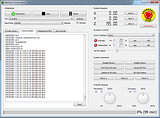
And when bed finiching heat:
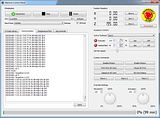
attached the FFF file.
Thanx!
JoeJ wrote:Why can't you check the option for both the extruder and the bed? Works fine for me with repetier firmware.
Post your factory file if you're still having trouble. It would also be useful to see the communication log from the machine control panel so we can see what the printer is saying.
JoeJ wrote:Why can't you check the option for both the extruder and the bed? Works fine for me with repetier firmware.
Post your factory file if you're still having trouble. It would also be useful to see the communication log from the machine control panel so we can see what the printer is saying.
Re: Check temp before begin build
Posted: Sat Nov 07, 2015 4:23 pm
by ABSolutely
You can make your own start script - attached is mine but all you need is M116. M116 waits for all set points to reach target before printing. You can also do M190 and M109 with specific target temps but it gets confused - suggest just using M116. For a full list:
http://reprap.org/wiki/G-code#
Re: Check temp before begin build
Posted: Sat Nov 07, 2015 8:54 pm
by Landin81
Ok, so M116 override that a G28 is sent to the printer before start the print?
What ever I put in to the script, the extruder and bed is G28 anyway before print =/
Re: Check temp before begin build
Posted: Sat Nov 07, 2015 10:44 pm
by ABSolutely
Open a small part - you won’t need to print it.
Open the process you’d want to print it with.
Go to the Script tab in the Process.
In the Start script, enter a comment (they begin with a semi-colon), such as: ; It put it here
In the End script, enter another comment...
Prepare the Print and save it’s Gcode.
Open the Gcode file you saved (opens with any text editor).
Look for your comments - that’s where your Scripted Gcode will go and you'll see what comes before and goes after it. Note that 95% of the lines above your comment are simply comments, not Gcode.
As far as it being at Home or going there with respect to a G-command, if you want to tell it go Home (any, or all axes), put G28 before the M116.
Re: Check temp before begin build
Posted: Sun Nov 08, 2015 4:09 am
by Landin81
ABSolutely wrote:Open a small part - you won’t need to print it.
Open the process you’d want to print it with.
Go to the Script tab in the Process.
In the Start script, enter a comment (they begin with a semi-colon), such as: ; It put it here
In the End script, enter another comment...
Prepare the Print and save it’s Gcode.
Open the Gcode file you saved (opens with any text editor).
Look for your comments - that’s where your Scripted Gcode will go and you'll see what comes before and goes after it. Note that 95% of the lines above your comment are simply comments, not Gcode.
As far as it being at Home or going there with respect to a G-command, if you want to tell it go Home (any, or all axes), put G28 before the M116.
I know how to check the Gcode file with my current script. But the problem is that the Bed temp have to finish before the extruder starts to heat up.
I want the extruder and bed to start heat up at the same time and the build dont start until both bed and extruder is heated up.
Re: Check temp before begin build
Posted: Sun Nov 08, 2015 6:34 am
by mroek
I guess if you put M116 (before G28) in the starting script, and also uncheck the "Wait for temperature..." for both bed and extruder under the temperature tab, you should get what you want.
Re: Check temp before begin build
Posted: Sun Nov 08, 2015 10:56 am
by ABSolutely
If you inspect the code before the spot where your inserted 'comment landed, you'll be able to see the previous commands - if there is a command to heat the Bed and Extruder before your comment, it will heat and wait until temps are reached. If the M-command for heating comes after your comment, you can manually insert the M116 after the Heating command. Look at the provided link for M and G commands of interest (do a word Find to see them all)...
It does not hurt the machine to try several options...
Re: Check temp before begin build
Posted: Sun Nov 08, 2015 11:10 am
by JoeJ
Another easy option would be to just order the preheating commands however you want in the starting script. If you use the [extruder*_temperature] and [bed*_temperature] variables in the script, the software knows you are handling preheating on your own, so it won't automatically add any preheating commands (which allows you to customize the exact preheating sequence). Note the * represents the "Temperature Number" for you extruder or bed, which you can verify on the Temperature tab of your process settings.
So in your starting script, just add the following at the beginning. For this example, I'll assume that the extruder and bed both use T0.
M104 S[extruder0_temperature] ; start heating extruder
M140 S[bed0_temperature] ; start heating bed
M109 S[extruder0_temperature] ; wait for extruder to reach setpoint
M190 S[bed0_temperature] ; wait for bed to reach setpoint
Because you started both the bed and extruder heating before the first M109/M190 command, then they will both heat together. However, keep in mind that this can put a lot of extra load on the power supply. A lot of printer manufacturers will tell you not to do this since it can damage the machine electronics by drawing too much current at once.

