supercazzola
Posts: 12
Joined: Wed Aug 02, 2017 2:16 pm

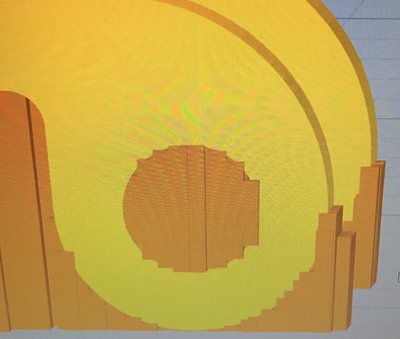
Which setting will bring the supports closer to the curves?

E884215D-63F6-48F2-AEA4-7947E27F978E.jpeg
I have zero issues with supports under large surfaces, but NEVER get good support when the object is small and vertically convex.

I went nuts manually inserting supports, so I’m assuming I have a setting that I’m overlooking.
S3d
S3d
Please help me get my round objects round.
User avatar
dkightley
Posts: 2405
Joined: Tue Mar 10, 2015 4:09 pm

Re: Which setting will bring the supports closer to the curv

The settings that adjust the separation of support from the model are the three values under the heading "Separation from Part" on the Support tab.

And to be truthful, I would slice that part with a much thinner layer thickness than what you have done this time.
Doug Kightley
Volunteer at the National Tramway Museum http://www.tramway.co.uk
Railway modeller and webmaster at http://www.talkingtgauge.net
supercazzola
Posts: 12
Joined: Wed Aug 02, 2017 2:16 pm

Re: Which setting will bring the supports closer to the curv

I just used the default for 0.2 mm and then added 1mm supports
arhi
Posts: 480
Joined: Thu Oct 06, 2016 5:13 pm

Re: Which setting will bring the supports closer to the curv

extra inflation distance on the support tab can be very useful with this type of objects (in combo with separation from part and everything else on this tab, but inflation is rather useful with curved bottom like what you have here)
gcodestat integrates with Simplify3D and allow you to
Calculate print time accurately (acceleration, max speed, junction deviation all taken into consideration)
Embed M117 codes into G-Code
Upload your G-Code directly to Octoprint
open source and unlicence

Return to “General Discussion and Tips”