Active Cooling Fan Not Turning On With Gcode
I have an active cooling fan on my Flash Forge Creator Pro. Layer height .2mm and first layer height 80%. Cooling fan is set to 0 for first layer and 100% at layer 2. When I print my models it doesn't appear that the cooling fan turns on after the first layer. Although when I manually go into the settings on the control panel I can turn the cooling fan on. Can anyone help me with this? My settings appear to be correct but Gcode isn't turning the fan on when it is suppose to.
Re: Active Cooling Fan Not Turning On With Gcode
Which command are you using to enable the fan? As far as I know FF Creator Pro is also using a sailfish firmware, so gpx is mandatory to create the x3g files.
What's set in the firmware options?
(just a hint where to look for. These are the values I use for a modified malyan m180, so no one should just copy these  )
)
bye,
para
What's set in the firmware options?
)bye,
para
Re: Active Cooling Fan Not Turning On With Gcode
This is mine, I haven't changed anything and sailfish is selected.
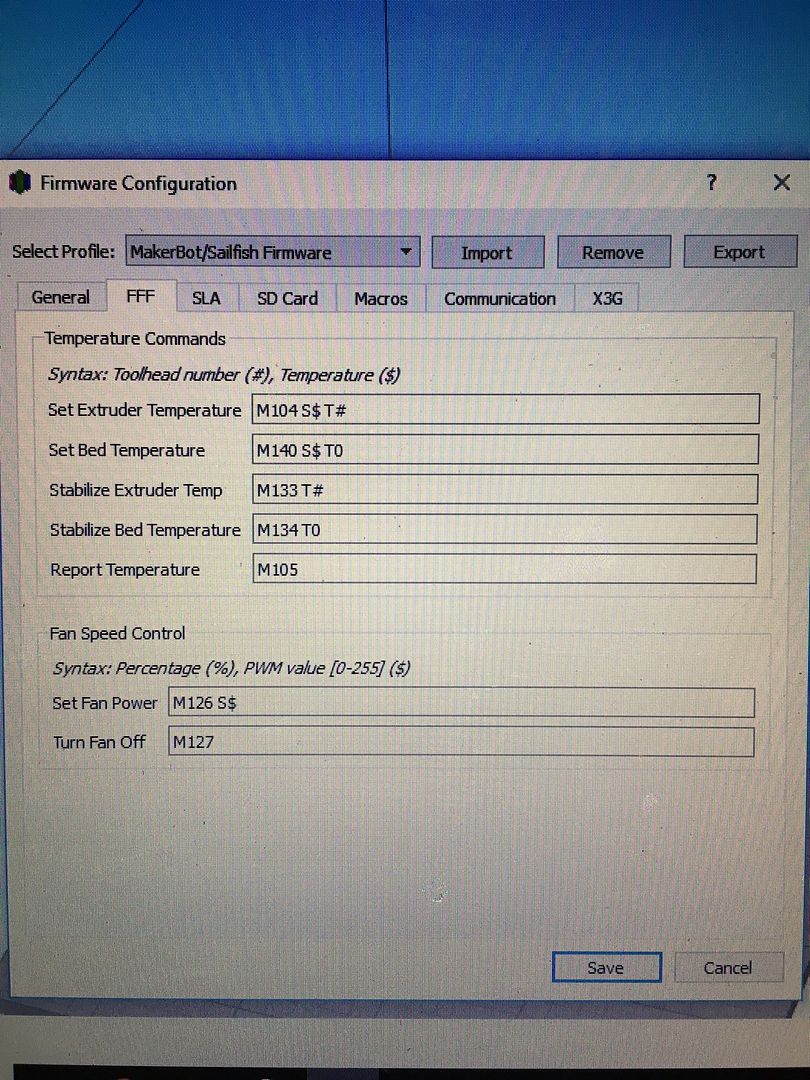
Re: Active Cooling Fan Not Turning On With Gcode
Seems to be turning on. Although didn't turn on at second layer. Does layer height or first layer height, etc. come into play here for what is actually considered a layer?
