PS: The files are in separate .tar.gz archives, to stay within the forum limit of 3 files of 3MB max. You could make it easier to report bugs in the future if these limits could be relaxed.
Slicer creates a bridge where there should be nothing
The bridge on layer 2, shown in the screenshot below, should not be there. Looks like a bug. I'm using Simplify3D 3.1.0, and I've attached the relevant files.
PS: The files are in separate .tar.gz archives, to stay within the forum limit of 3 files of 3MB max. You could make it easier to report bugs in the future if these limits could be relaxed.
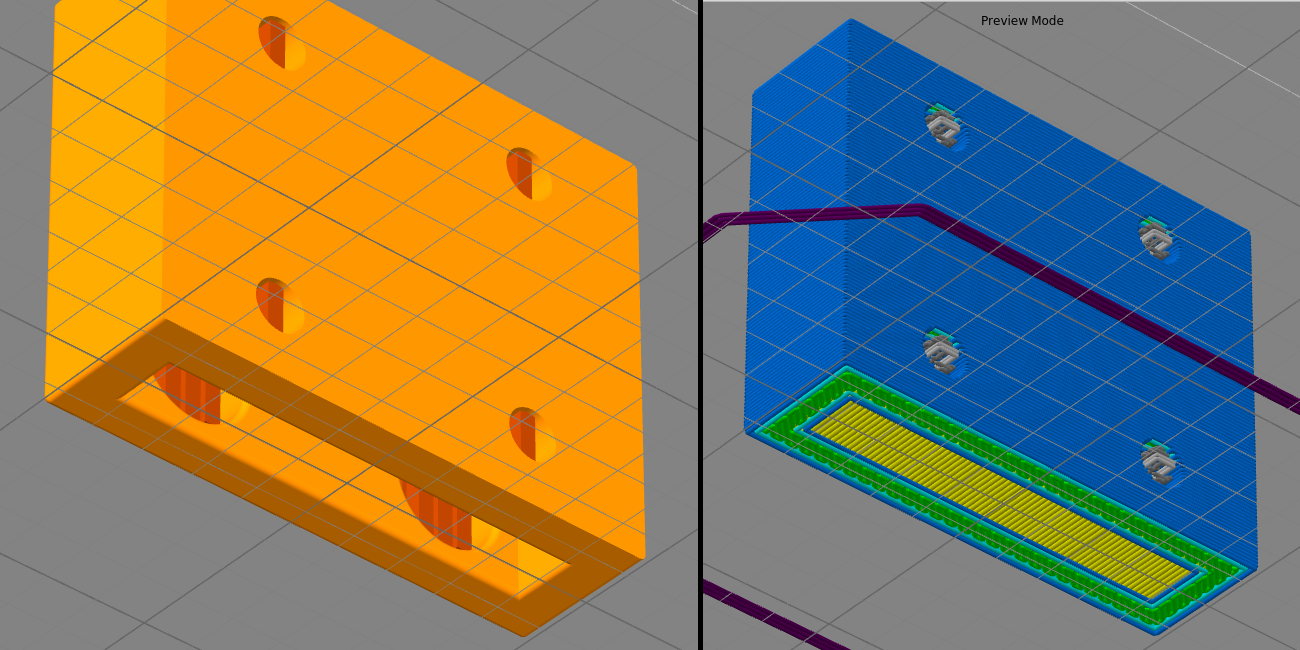
PS: The files are in separate .tar.gz archives, to stay within the forum limit of 3 files of 3MB max. You could make it easier to report bugs in the future if these limits could be relaxed.
- Attachments
-
- factory+gcode.tar.gz
- The FACTORY and GCODE files (gzipped for file-size and file-limit)
- (1.97 MiB) Downloaded 163 times
-
- Screenshots of STL and GCODE
-
- wall-part.stl.tar.gz
- The STL file (gzipped for file-size)
- (1.89 MiB) Downloaded 164 times

Re: Slicer creates a bridge where there should be nothing
Try changing the layer height to 0.4004 mm and re-slice.
There is some sort of anomaly in the mesh that S3D is not able to interpret correctly when it is encountered at a multiple of 0.4 mm. Changing the thickness to 0.4004 mm misses the exact spot that is causing the issue.
This is a known issue that I used to happen fairly often. Some development changes in one of the more recent mini-releases seemed to reduce the frequency of this issue...but you must have a model that is still causing the problem.
btw..you only needed to attach the factory file. It contains the stl file.....and the gcode file could be created simply by slicing.
There is some sort of anomaly in the mesh that S3D is not able to interpret correctly when it is encountered at a multiple of 0.4 mm. Changing the thickness to 0.4004 mm misses the exact spot that is causing the issue.
This is a known issue that I used to happen fairly often. Some development changes in one of the more recent mini-releases seemed to reduce the frequency of this issue...but you must have a model that is still causing the problem.
btw..you only needed to attach the factory file. It contains the stl file.....and the gcode file could be created simply by slicing.
Doug Kightley
Volunteer at the National Tramway Museum http://www.tramway.co.uk
Railway modeller and webmaster at http://www.talkingtgauge.net
Volunteer at the National Tramway Museum http://www.tramway.co.uk
Railway modeller and webmaster at http://www.talkingtgauge.net
Re: Slicer creates a bridge where there should be nothing
I see. Well, I'm happy to've been able to provide a useful test-case.dkightley wrote:Try changing the layer height to 0.4004 mm and re-slice.
There is some sort of anomaly in the mesh that S3D is not able to interpret correctly when it is encountered at a multiple of 0.4 mm. Changing the thickness to 0.4004 mm misses the exact spot that is causing the issue.
This is a known issue that I used to happen fairly often. Some development changes in one of the more recent mini-releases seemed to reduce the frequency of this issue...but you must have a model that is still causing the problem.
It's nice to know there is a (somewhat awkward) workaround. But this is kind of a serious bug that needs to be fixed properly.
@Simplify3D: As a software engineer, may I propose a way to automatically detect this kind of bug: For each generated extrusion move, double-check that every point on that line segment lies within a certain threshold distance from the closest point on the mesh. A naive implementation of this may be too computationally expensive to make a part of the normal slicing routing, but if there is no smarter way to test this, it may still be a good as an optional quality check, or at the very least as a part of your test suite.
I should probably have realized this. Why else would the factory file be so large?dkightley wrote:btw..you only needed to attach the factory file. It contains the stl file.....and the gcode file could be created simply by slicing.
 Thanks!
Re: Slicer creates a bridge where there should be nothing
I just checked the model, and there's actually quite a few mesh errors with the part, so that's likely why you're seeing issues when slicing. You can run the self-intersecting surfaces check to see this in S3D. All of the issues look like they are in the rounded corners, so you probably have some extra surfaces or something in that area that didn't get merged in properly.
As dkightley said, with recent versions of the software, I haven't found any parts that were a valid mesh that had trouble slicing. I also did a search for some prior posts on the forum where people used the 0.0001mm layer height adjustment, and all of those parts slice correctly in 3.1.1. So I would say that layer height adjustment is no longer needed, and it's better to recommend checking the original model for mesh errors like this.
As dkightley said, with recent versions of the software, I haven't found any parts that were a valid mesh that had trouble slicing. I also did a search for some prior posts on the forum where people used the 0.0001mm layer height adjustment, and all of those parts slice correctly in 3.1.1. So I would say that layer height adjustment is no longer needed, and it's better to recommend checking the original model for mesh errors like this.
